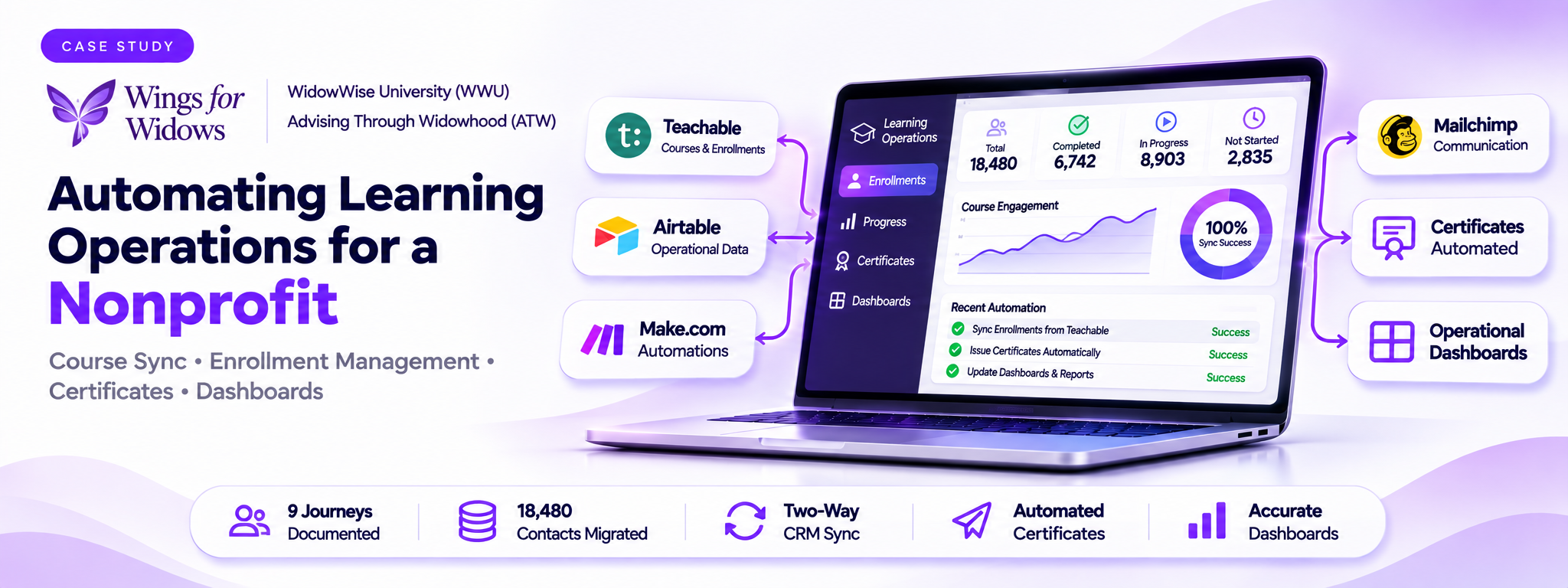
WidowWise Platform Automation, Data Integrity & Dashboard Modernization
Repairing and expanding a connected learning platform with automated enrollment synchronization, accurate reporting, and certificate delivery.
 Make Automations
- Make
- Airtable
1. Overview
Wings for Widows is a Minnesota-based nonprofit that provides free one-to-one financial coaching to widows through a network of approximately 150–170 volunteer CFP advisors. Its digital learning operations run through two distinct programs: WidowWise University (WWU), which provides free and scholarship-funded courses, and Advising Through Widowhood (ATW), a separate paid financial advisor certificate program.
The platform uses Teachable for course delivery, Airtable for operational data and dashboards, Make.com for email and certificate workflows, and Mailchimp for student and advisor communications.
The engagement focused on reverse-engineering and repairing an existing automation system, resolving recurring data and dashboard problems, improving enrollment synchronization, and expanding reporting and certificate automation.
Client: Wings for Widows Platform: WidowWise / WidowWise University Additional Program: Advising Through Widowhood (ATW) Industry: Nonprofit · Financial Education · Professional Training
2. The Problem
The existing system had recurring synchronization and reporting problems that affected enrollment records, dashboard accuracy, and student completion workflows.
The main challenges included:
- Inaccurate dashboards: Engagement status fields were sometimes blank, causing totals and charts to show incorrect figures.
- Duplicate enrollment records: The original synchronization logic could overwrite previous enrollment history when a student enrolled in the same course more than once.
- Unreliable data synchronization: Teachable enrollment data was not consistently matched to the correct Airtable records.
- Manual certificate issuance: Completed students required a manual certificate process, creating delays and additional administrative work.
- Data quality issues: Duplicate registrations, unmatched enrollment records, and incorrectly classified records affected reporting accuracy.
- Automation ownership risk: The primary Teachable API secret belonged to the previous developer, creating a dependency for maintaining the synchronization system.
3. How It Works
The solution connects the learning platform, operational database, automation workflows, and communication system.
Step 1 — Teachable to Airtable Synchronization
Teachable provides the course, student, enrollment, completion, and transaction information used by the operational system.
Airtable serves as the central data layer, containing 20 tables covering people, enrollments, completions, products, lessons, modules, transactions, prices, coupons, graduates, and automation errors.
Scheduled JavaScript automations synchronize Teachable information into Airtable.
Step 2 — Enrollment Matching and Data Integrity
The original enrollment-matching logic used a combination of course and user identifiers. This could cause a new enrollment cycle to overwrite an earlier record.
The matching logic was rebuilt around each enrollment's actual Person and Product relationships.
- Existing records for the same person and course are identified.
- The record with the highest completion percentage is treated as the current enrollment cycle.
- A new record is created only when progress has moved backwards, indicating a genuine restart.
- Historical enrollment information is preserved instead of being overwritten by a duplicate synchronization event.
Additional JavaScript and Airtable field-formatting issues were identified during testing and corrected before production.
Screenshot to add: Teachable enrollment records alongside their corresponding Airtable enrollment records. Highlight the Person and Product relationships and the corrected matching logic.
Step 3 — Engagement Status and Dashboard Accuracy
Dashboard totals were not reconciling because some incoming Teachable records had blank Engagement Status fields.
The synchronization process was updated so Engagement Status is automatically derived from Percent Complete on every sync run.
- Existing records with blank statuses were backfilled using actual completion data.
- The recurring synchronization logic was corrected so new records receive the appropriate status automatically.
- A separate In Progress metric was fixed after identifying an incorrect filter and inconsistent Percent Complete data.
This removed the need for repeated manual corrections to dashboard records.
Screenshot to add: Airtable dashboard showing Total, Completed, In Progress, and Not Started, alongside the Engagement Status and Percent Complete fields.
Step 4 — Graduation and Certificate Automation
A certificate automation pipeline was built around the student's completion status.
When Engagement Status changes to Completed:
- A sequential Certificate ID is generated.
- Certificate and mailing details are sent to C&M Printing.
- Chris receives the CFP continuing-education filing information.
- The process is gated to prevent certificates from being issued when registration data is incomplete or mismatched.
The workflow also addressed real completion-record issues, including students stuck at 99% and certificate records requiring manual intervention.
Screenshot to add: Make.com certificate automation scenario, the generated Certificate ID in Airtable, and an example of the certificate notification workflow.
Step 5 — Dashboard Expansion
Several dashboards were built or improved to provide more reliable operational reporting.
- ATW Enrollments: Corrected metric-card calculations so dashboard figures reconcile.
- All Courses (Select to Filter): Created a unified dashboard with a live course-selection dropdown.
- ATW Progression (Pace & Stuck Points): Rebuilt based on detailed client feedback, including a clearer advisor grid, normalized completion percentages, and enrollment information.
- Percent Complete (Normalized): Added a safety-net formula to protect against incorrectly scaled Teachable values.
Screenshot to add: The ATW Enrollments dashboard, All Courses dashboard with its course selector, and ATW Progression dashboard.
Step 6 — Automation Ownership and Reliability
The Teachable API credential previously belonged to the original developer, creating an operational dependency.
A new independently owned API secret was created, and the synchronization automation was repointed to use it.
This restored the client's control over the integration and reduced dependency on the previous developer.
Screenshot to add: Teachable API integration configuration and the relevant Make.com or Airtable automation scenario. Do not expose API keys or credentials.
4. The Result
The engagement transformed a recurring maintenance problem into a more reliable learning and reporting system.
Enrollment synchronization was rebuilt around actual student and course relationships, preserving enrollment history and reducing the risk of duplicate records. Dashboard calculations were corrected, and Engagement Status is now automatically derived from completion data during synchronization.
Certificate issuance was automated through sequential Certificate IDs, print-partner notifications, and completion checks. Additional dashboards improved visibility into course enrollment, advisor progression, and student completion.
The platform's API ownership was also transferred away from the previous developer, giving the client independent control over the integration.
5. Results & Metrics
The source documents specific implementation outcomes rather than a complete before-and-after performance study.
| Area | Documented outcome |
|---|---|
| Airtable operational database | 20 tables |
| Enrollment synchronization | Rebuilt around Person and Product relationships |
| Engagement Status | Automatically derived on every sync |
| Dashboard accuracy | Metric-card calculations corrected |
| Certificate workflow | Sequential Certificate ID and automated notifications |
| Dashboard expansion | ATW Enrollments, All Courses, and ATW Progression |
| API ownership | New independently owned Teachable API secret |
6. Tech Stack
- Teachable: Learning management system hosting courses and enrollment information.
- Airtable: Central operational database, enrollment records, completion tracking, and dashboards.
- Airtable Automations: JavaScript-based scheduled synchronization and data processing.
- Make.com: Outbound email automation and graduation/certificate workflows.
- Mailchimp: Student and advisor communications, including welcome, reminder, continuation, completion, and access-related emails.
7. Where This Pattern Applies
- Nonprofit Organizations: Manage scholarship programs, participant records, course completion, and automated communications.
- Educational Institutions: Synchronize student enrollments, academic progress, certificates, and reporting dashboards.
- Professional Certification Providers: Automate eligibility checks, completion tracking, certificate generation, and continuing-education records.
- Online Learning Platforms: Maintain accurate student histories across repeat enrollments, course restarts, and completion cycles.
- Coaching Organizations: Track client and advisor progress, program participation, and follow-up workflows.
- Training and Development Teams: Combine learning platforms with operational databases to monitor employee training and certification.
This pattern is useful for organizations that rely on multiple connected platforms to manage people, enrollments, learning progress, and communications. By improving synchronization, data integrity, and workflow automation, they can build a more dependable operational system around their existing tools.