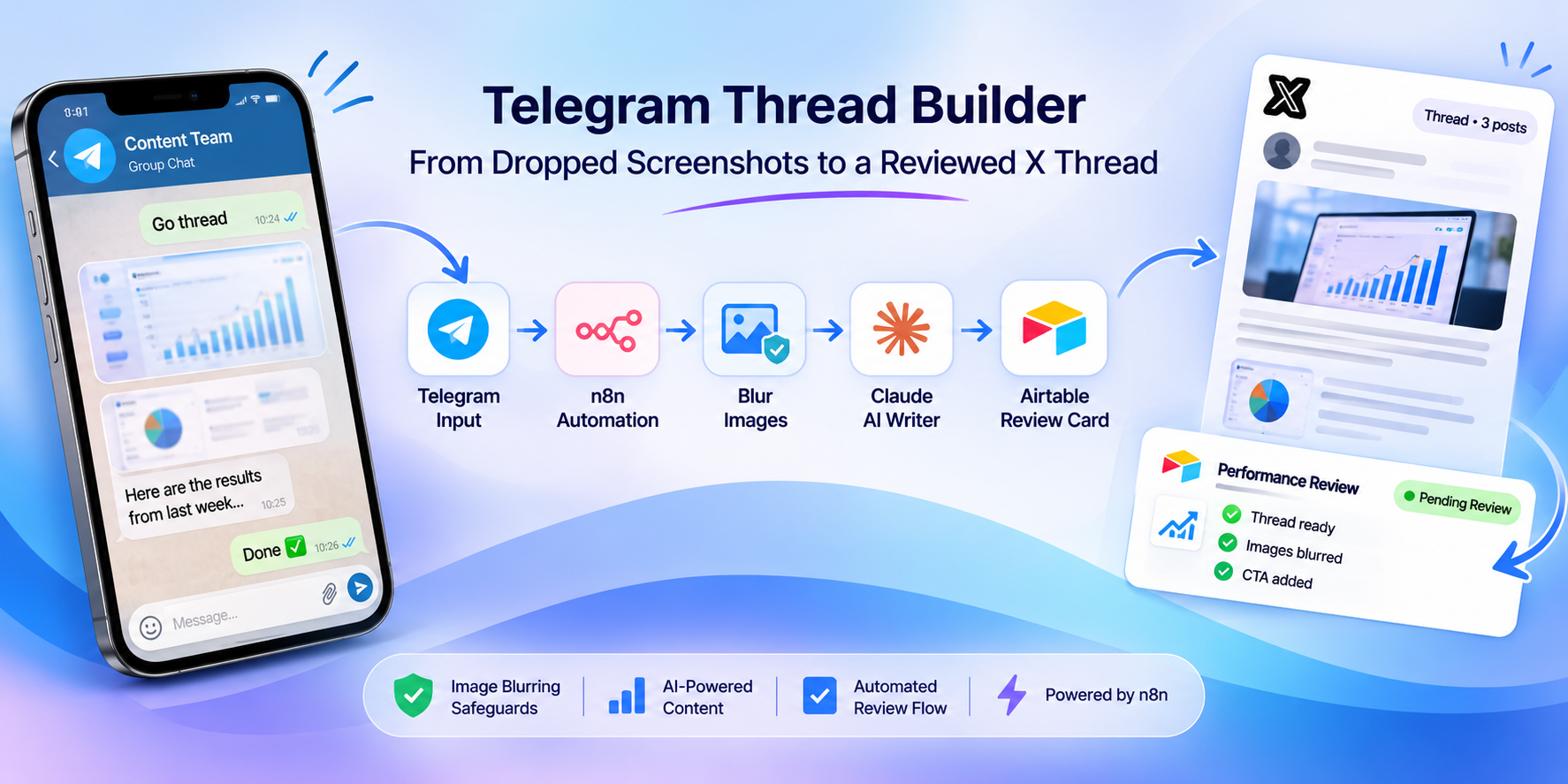
Telegram Thread Builder: From Dropped Screenshots to a Reviewed X Thread
An n8n workflow that turns a source text and screenshots dropped in a Telegram chat into a ready-to-review X thread, with automatic image blurring, AI writing and a card created in Airtable.
 n8n Automations
- n8n
- Telegram
- Airtable
- Claude
- X
Telegram Thread Builder: From Dropped Screenshots to a Reviewed X Thread
Transform source text, screenshots, and team notes shared in Telegram into AI-generated X threads or single posts, with automatic image blurring and an Airtable review workflow.
Project Overview
The Telegram Thread Builder is an n8n automation designed for content teams that collect ideas, source material, and screenshots in a Telegram group. It turns these inputs into structured X threads or individual posts without requiring the team to leave Telegram during content preparation.
The workflow manages the entire process, from collecting source material and asking setup questions to blurring images, generating content with Claude, applying calls to action, and creating a review card in Airtable.
Each session is tracked in Airtable, allowing the workflow to preserve messages, images, captions, and notes throughout the process. The resulting content is marked Pending Review, giving the team an opportunity to inspect the draft and verify image blurring before approval.
Technology stack: n8n, Telegram, Airtable, Claude, image-blurring service, X content workflow.
01. The Business Problem: Turning Unstructured Ideas into Publishable Content
Content teams often collect information in chat conversations, with source text, screenshots, captions, and notes spread across multiple messages. Turning this material into a coherent X thread requires manual organization, writing, image preparation, formatting, and review.
The process creates several challenges:
- Scattered source material: Text, screenshots, and captions may arrive in separate Telegram messages.
- Manual content creation: Writers must organize the material into a logical sequence and maintain a consistent voice.
- Image privacy: Screenshots may contain page names, logos, or faces that need to be blurred before use.
- Inconsistent formatting: Threads must follow an agreed post count, image order, writing style, and call-to-action placement.
- Lost context: Without session tracking, it becomes difficult to preserve all the material collected during a conversation.
- Review overhead: Drafts, images, and approvals need to be organized in a central location.
The goal was to turn this unstructured collection process into a guided, repeatable workflow with safeguards and a clear human-review stage.
02. The Solution: Telegram-Based Content Generation and Review
The workflow uses Telegram as the team's conversational interface. A user starts a session, submits text and screenshots, answers a small set of configuration questions, and triggers the content-generation process.
n8n stores session materials in Airtable, retrieves the images in order, sends them through an image-blurring service, and verifies that the required blurring has succeeded. Claude then receives the source material, blurred images, captions, notes, and current writing rules from Airtable.
After generation, code nodes clean and validate the draft, enforce the requested post count, check image order, and insert calls to action from the Airtable CTA library.
The workflow creates an Airtable review card containing the draft, hook, and blurred images. Telegram then returns a summary with a preview and a link to the card.
The system also supports single-post requests by routing them through the team's existing content-intake workflow.
03. Project Snapshot
| Item | Detail |
|---|---|
| Platform | n8n |
| Input channel | Telegram group chat |
| Content destination | X |
| AI writing | Claude |
| Session and content storage | Airtable |
| Image processing | External image-blurring service |
| Workflow size | Approximately 65 nodes |
| Session duration | 12 hours |
| Image capacity | Up to 15 images per session |
| Setup timeout | 10 minutes before defaults are applied |
| Output formats | Multi-post X thread or single post |
| Review status | Pending Review |
| Rule and CTA management | Airtable |
04. How the System Works
The workflow follows five main stages, from collecting the source material to delivering a review-ready draft.
Step 1: Start a Session and Collect Materials
A team member replies Go to a submitted text or image. The message can also specify a format, such as thread, image, text, or long.
The bot explains how to provide the source material:
- Send screenshots in the required order.
- Add captions beneath images when a particular caption should become the text for that post.
- Send additional source text or notes.
- Send
donewhen the material is ready. - Send
cancelto stop the session.
Telegram may split long text into multiple messages. The workflow merges those parts back together in the correct order.
Each image and text item is saved as a separate Airtable row linked to the session. Sessions remain open for 12 hours.
Step 2: Configure the Content
Once the user sends done, the bot asks only the questions that remain unanswered.
These can include:
- How many posts should the thread contain?
- Which call to action should be used, and where should it appear?
- Should the images be blurred?
The questions are numbered so the user can respond with a simple number. Typing go accepts the defaults for any remaining questions, while options supplied with the initial Go command can skip questions entirely.
The bot summarizes the selected configuration. Replying 1 starts the build.
If the user does not respond within 10 minutes, the workflow proceeds automatically using the defaults.
Step 3: Prepare and Blur Images
The workflow retrieves the session's images in their original order, up to a maximum of 15, and downloads them from Telegram.
Each image is sent to an external blurring service designed to hide page names, logos, and faces.
The workflow then checks whether every image has returned successfully blurred. If any image fails, content generation is stopped, the session is reopened, and Telegram identifies the failed images and reasons where available.
The user can correct the issue and send done again rather than restarting the entire session.
If the team explicitly chooses no blur, the workflow follows that configuration instead.
Step 4: Generate the Thread with Claude
Claude receives the source text, team captions and notes, blurred images, and current Post Rules from Airtable.
The writing instructions specify the requested number of posts, preserve the intended image order, and require the writer to use the facts contained in the supplied material, including relevant numbers and labels in screenshots.
The requested writing style includes:
- A strong, extended opening hook.
- Follow-up posts that each contribute one step to the story.
- An analytical post near the end.
- Consistent use of the agreed content format.
- No naming of pages, people, or brands shown in the source material.
These constraints help turn collected material into a coherent thread rather than a sequence of unrelated summaries.
Step 5: Validate, Add CTAs, and Deliver
After Claude generates the content, a code node cleans the output by removing unwanted links, handles, attribution credits, post numbering, and stock phrases.
It then checks the post count and verifies that each image is used exactly once and in the correct order. If the image sequence is incorrect, the workflow redistributes the images.
Calls to action are selected from the Airtable CTA library. Examples include a newsletter CTA at the end of a thread or a consulting CTA placed at post four.
The workflow creates an Airtable card containing:
- The opening hook.
- The complete thread or post.
- The selected CTA.
- The associated blurred images.
- The status
Pending Review.
Finally, the session is marked complete and Telegram sends a summary containing the post count, image count, selected CTA, a preview of the hook, and a link to the review card.
05. Workflow Architecture
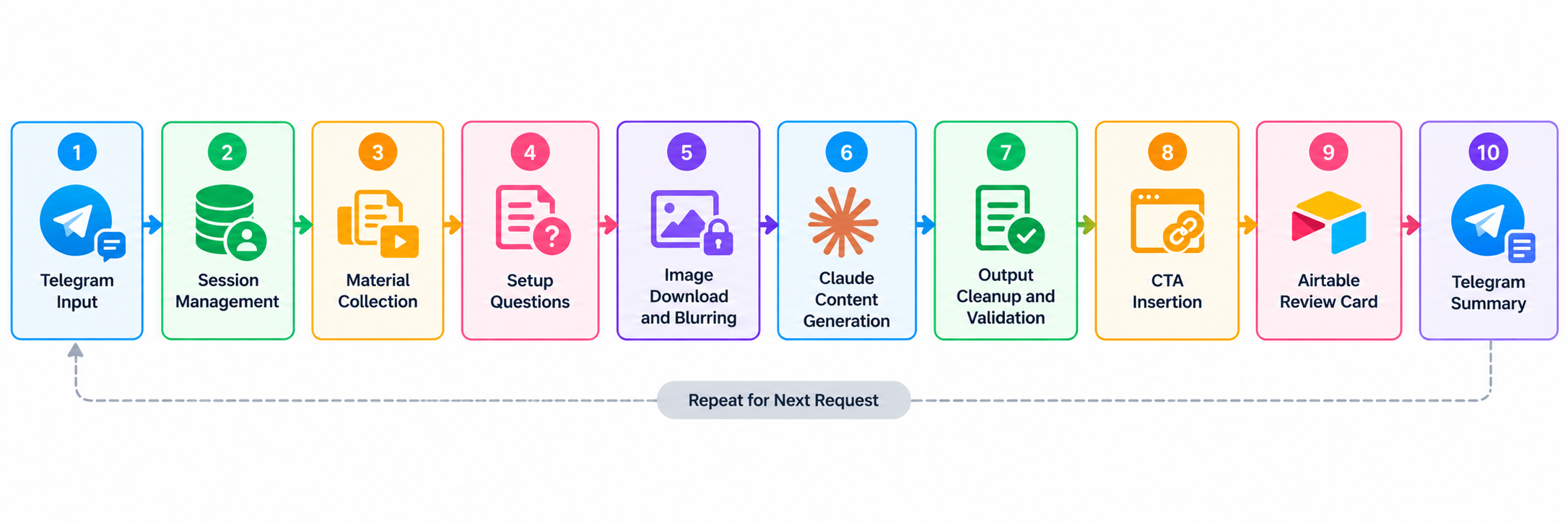
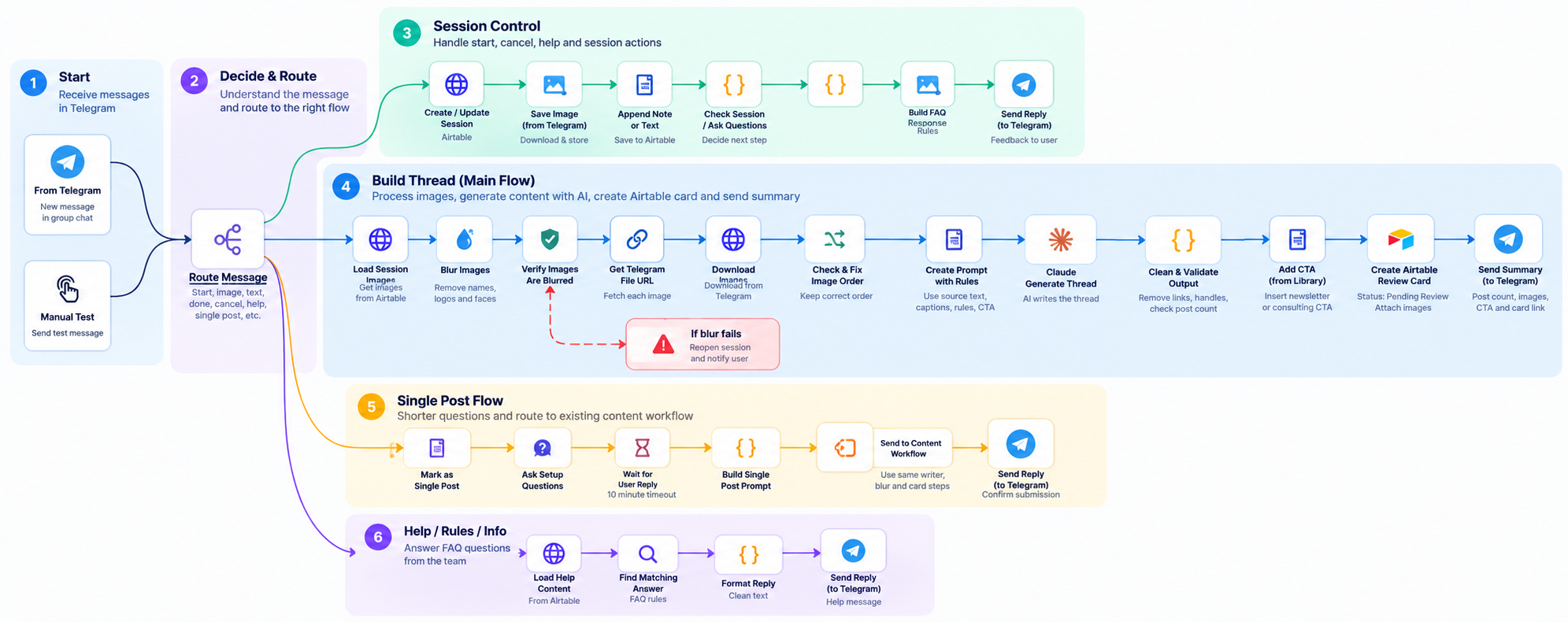
The workflow contains approximately 65 nodes, organized into functional sections.
- Input and session management: Interprets Telegram messages and manages session state.
- Material collection: Stores text, captions, notes, and images in Airtable.
- Configuration: Resolves post count, CTA placement, and image-blurring preferences.
- Image processing: Downloads, blurs, and validates screenshots.
- AI writing: Sends source material and current writing rules to Claude.
- Content validation: Cleans the output, checks post count, and verifies image usage.
- Delivery and review: Creates the Airtable card, attaches images, and returns the card link through Telegram.
Additional branches manage configuration timeouts, cancellation, retry handling, and single-post requests.
06. Single-Post Generation
The workflow also supports individual posts that do not require a multi-post thread.
After the user sends Go, the bot asks the shorter set of configuration questions. The workflow combines the source text, captions, first image, and selected CTA into a single request.
That request is passed to the team's existing content-intake workflow, allowing single posts to reuse the established writing, image-blurring, and Airtable-card creation steps.
This keeps the single-post path aligned with the thread-generation process without duplicating the entire content pipeline.
07. Built-In Safeguards and Validation
The workflow includes several controls designed to prevent incomplete or unusable content from reaching the review stage.
Image-Blurring Validation
- Images are processed before they are attached to the generated content.
- The workflow checks the returned images for successful blurring.
- If a required blur operation fails, thread generation stops.
- The session is reopened so the team can retry after addressing the issue.
The team can explicitly choose not to blur images where appropriate.
AI Output Validation
- The generated content is cleaned before delivery.
- The final post count is checked against the agreed configuration.
- Images must be used exactly once and in the correct order.
- If the writer returns unusable output, no review card is created.
Failure Recovery
- When blurring or writing fails, the session is reopened and the team is notified through Telegram.
- The user can retry using
donewithout starting a new session. - Image-upload failures are reported in the final summary.
These safeguards are designed to prevent incomplete drafts from being treated as ready for review. They do not replace a human check of image privacy, factual accuracy, and content quality.
08. Airtable as the Content Control Center
Airtable stores the information needed to manage sessions and control the writing process.
| Airtable component | Purpose |
|---|---|
| Session records | Track the active content-building session. |
| Material rows | Store submitted text, captions, notes, and images against the session. |
| Post Rules | Provide the current writing instructions used by Claude. |
| CTA library | Supply approved calls to action and placement options. |
| Review cards | Store the generated hook, thread, images, and review status. |
Because Post Rules, CTAs, and session materials are stored in Airtable, the team can update writing preferences and content options without changing the n8n workflow itself.
09. Results and Deliverables
The supplied project description documents the workflow's design and capabilities but does not include measured production metrics such as hours saved, generation success rate, content approval rate, or publishing performance.
Delivered Capabilities
- Telegram-based session creation and content collection.
- Support for text, screenshots, captions, and notes.
- Automatic merging of split Telegram text messages.
- Session persistence through Airtable.
- Configuration questions with default values and timeout handling.
- Image blurring and validation before content generation.
- Claude-powered thread and single-post generation.
- Automated post-count and image-order checks.
- CTA selection from an Airtable library.
- Airtable review-card creation with
Pending Reviewstatus. - Telegram delivery of a summary and review link.
- Retry and recovery paths for several processing failures.
Metrics to Track Next
To quantify the business impact, a pilot should measure:
- Average time required to produce a thread manually versus using the workflow.
- Number of sessions and drafts generated per week.
- Percentage of sessions completed successfully.
- Image-blurring success and retry rates.
- Percentage of generated drafts approved without major edits.
- Average number of content revisions per draft.
- Time from initial Telegram submission to review-card creation.
These measurements would help establish whether the automation reduces preparation time while maintaining the team's content and privacy standards.
10. Key Takeaways
- Use chat as the intake interface: Teams can submit ideas and screenshots where they already collaborate.
- Preserve session context: Saving every item in Airtable reduces the risk of losing source material across multiple messages.
- Automate repetitive preparation: Image handling, content formatting, CTA insertion, and card creation happen within the same workflow.
- Validate before delivery: Image checks and output validation reduce the risk of incomplete drafts reaching review.
- Keep writing rules configurable: Airtable allows the team to update Post Rules and CTAs without editing the automation.
- Retain human review: The workflow prepares content for approval instead of automatically publishing it to X.
The next stage should focus on measuring reliability, improving review visibility, and refining content quality.
11. Future Development
- Track generation success, retry rates, and average processing time.
- Record review outcomes and common reasons for content revisions.
- Add clear audit information for image-blurring failures and content-validation failures.
- Improve visibility into session expiration and abandoned sessions.
- Evaluate whether generated threads consistently follow the team's style and factual requirements.
- Consider adding a publishing integration only if the team wants to extend the current review-first process.
12. Final Outcome
The Telegram Thread Builder converts source text, screenshots, and team notes into structured X threads or single posts through a guided conversational workflow.
By combining n8n, Telegram, Claude, and Airtable, it automates session management, image preparation, AI writing, content validation, CTA insertion, and review-card creation.
The result is a repeatable content-preparation process that keeps source material organized, applies image-blurring safeguards, and gives the team a central place to review generated drafts before publication.