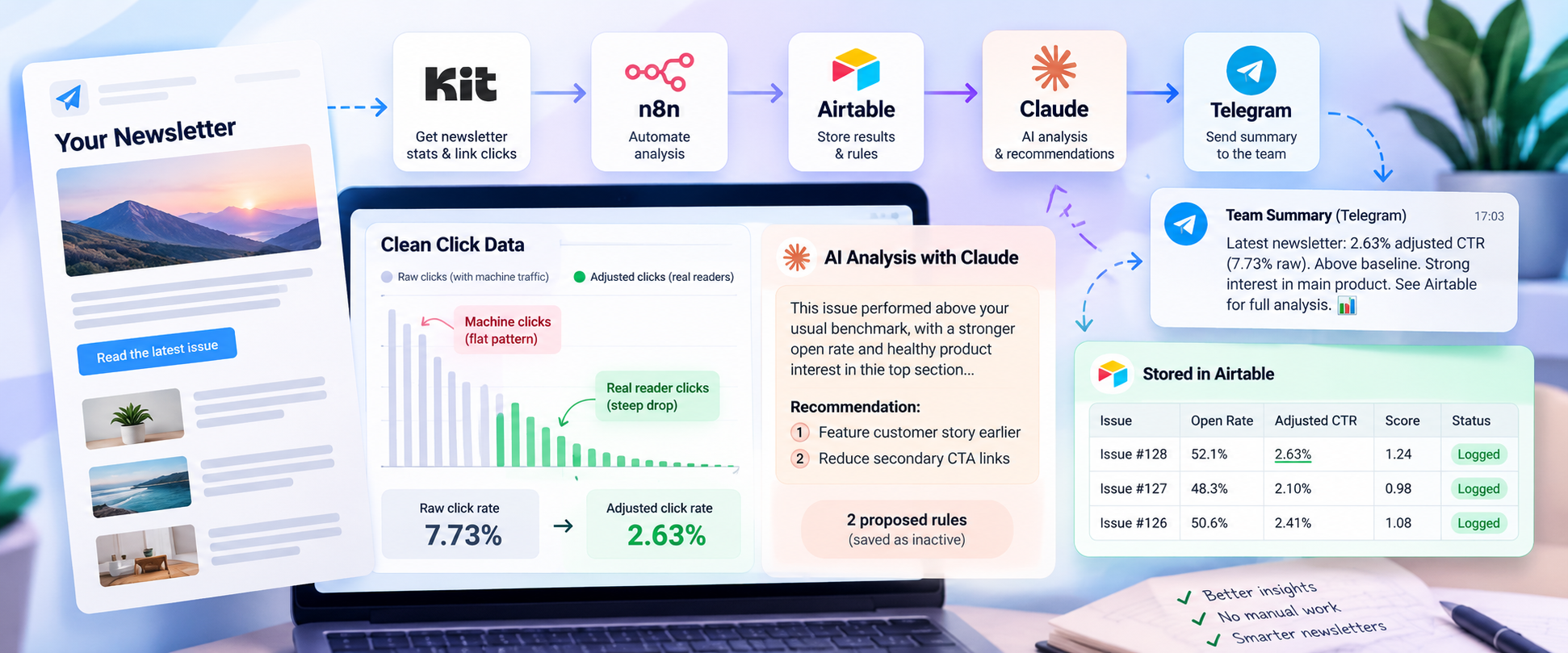
Newsletter Performance Agent: Daily Scoring of Every Sent Issue
An n8n workflow that finds each newsletter issue after it is sent, removes machine clicks from the numbers, scores it against the account’s own baseline, and posts an AI analysis to the team.
 n8n Automations
- n8n
- Kit
- Airtable
- Claude
- Telegram
Newsletter Performance Agent: Daily Scoring of Every Sent Issue
Automatically analyze newsletter performance, filter machine-generated clicks, compare each issue against historical benchmarks, and deliver AI-powered insights to the team.
Project Overview
The Newsletter Performance Agent is an automated analytics workflow built with n8n for a publisher using Kit to distribute regular email newsletters. It identifies newly sent newsletter issues, retrieves their performance statistics, adjusts click metrics for suspected machine traffic, and compares each issue against the account's historical performance.
Claude analyzes the results using the account's existing newsletter rules and returns a structured performance assessment with evidence-based recommendations. The workflow stores the complete analysis in Airtable, sends a concise summary to the team through Telegram, and records each execution for tracking.
The system is designed to support better newsletter decisions without allowing AI-generated recommendations to become active rules automatically.
Technology stack: n8n, Kit, Airtable, Claude, Telegram.
01. The Business Problem: Reliable Newsletter Performance Analysis
Newsletter performance data can be misleading. Email security gateways may automatically click links to inspect their safety, inflating reported engagement and making it difficult to understand what readers actually clicked.
Comparing issues also requires a consistent baseline. A newsletter sent to a small segment should not necessarily be judged against a full-list send, and raw engagement figures alone cannot explain whether a particular issue performed better or worse than usual.
The main challenges were:
- Machine-generated clicks: Automated link scanning can inflate click-through rates.
- Inconsistent comparisons: Each newsletter needs to be evaluated against the account's own historical performance.
- Limited link-level insights: Product interest and link placement need to be analyzed across campaigns.
- Repeated manual reporting: Statistics, comparisons, and recommendations otherwise require separate steps.
- Risk of unsupported recommendations: AI must not invent data, treat clicks as sales, or recommend rules already in force.
02. The Solution: Automated Performance Scoring and AI Analysis
A single n8n workflow runs daily at 17:00 South African time and can also be started manually.
The workflow retrieves recent issue records from Airtable and broadcasts from Kit, selects the newest completed send from the last 36 hours that has not already been logged, and collects its performance and link-click data.
Code nodes calculate adjusted metrics, establish historical comparisons, attribute clicks to products and positions, and flag uncertain data. Claude then analyzes the prepared results against the active newsletter rules stored in Airtable.
The final report is saved to Airtable. A short summary is sent to the team's Telegram feedback group, each run is logged, and any proposed rules are saved as inactive records for human review.
03. Project Snapshot
| Item | Detail |
|---|---|
| Platform | n8n |
| Newsletter service | Kit |
| Analytics and storage | Airtable |
| AI analysis | Claude |
| Team notifications | Telegram |
| Schedule | Daily at 17:00 South African time, with manual execution available |
| Issue selection | Newest completed send within the previous 36 hours that has not been logged |
| Historical context | Last 40 logged issues in Airtable |
| Click analysis | Machine-click adjustment and link-level attribution |
| Output | Performance score, AI analysis, recommendations, and run log |
| Rule activation | Manual approval required |
04. How the System Works
The workflow follows a series of stages from issue selection through performance analysis and reporting.
Step 1: Scheduled Execution and Historical Data
The workflow starts on its daily schedule or through a manual trigger. It reads the last 40 logged issues from Airtable and retrieves the available broadcasts from Kit.
Step 2: Identify the Newsletter Issue
The workflow selects the newest completed send within the previous 36 hours that has not already been recorded.
If no eligible issue exists, the workflow stops without producing a score. The Kit broadcast ID and send date are used to prevent an issue from being scored more than once.
Step 3: Retrieve Performance Statistics
The workflow retrieves the selected issue's performance statistics and link-level click report from Kit.
If link-level data is unavailable, the workflow continues with raw click figures and marks them as unverified. This uncertainty is carried into the subsequent analysis.
Step 4: Calculate and Adjust Metrics
A code node removes suspected machine-generated clicks, calculates performance against the account's historical baseline, and attributes link clicks to product campaigns and newsletter positions.
The calculation also identifies conditions that could affect interpretation, including segment sends and missing campaign tags.
Step 5: Generate the AI Analysis
The workflow retrieves active newsletter rules from Airtable and sends Claude the calculated metrics, relevant historical context, and existing rules.
Claude returns structured analysis. A subsequent code node cleans the output, limits proposed rules, and labels each recommendation as PROPOSAL, not active.
Step 6: Save and Share the Results
The completed performance report is saved as a new record in Airtable's Performance table, including statistics, score, analysis, and recommendations.
Two follow-up branches then run:
- Team reporting: Sends a concise summary to the Telegram feedback group and records the workflow run.
- Rule management: Stores proposed rules in Airtable's Newsletter Rules table as inactive entries.
05. Workflow Architecture
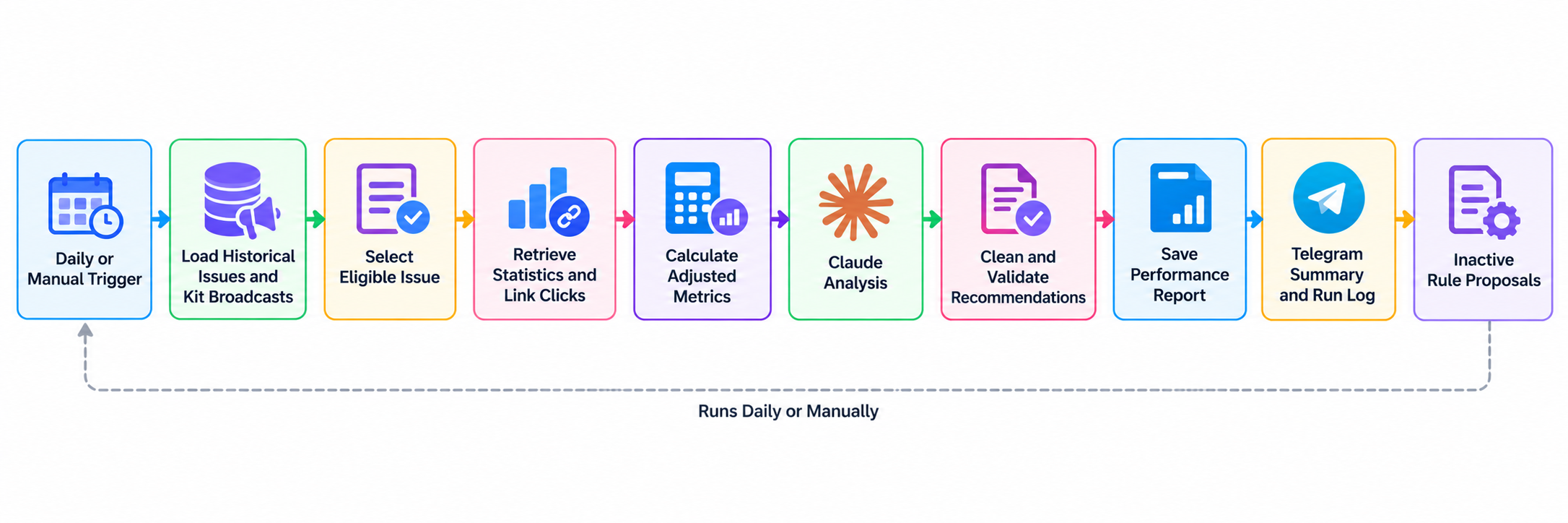
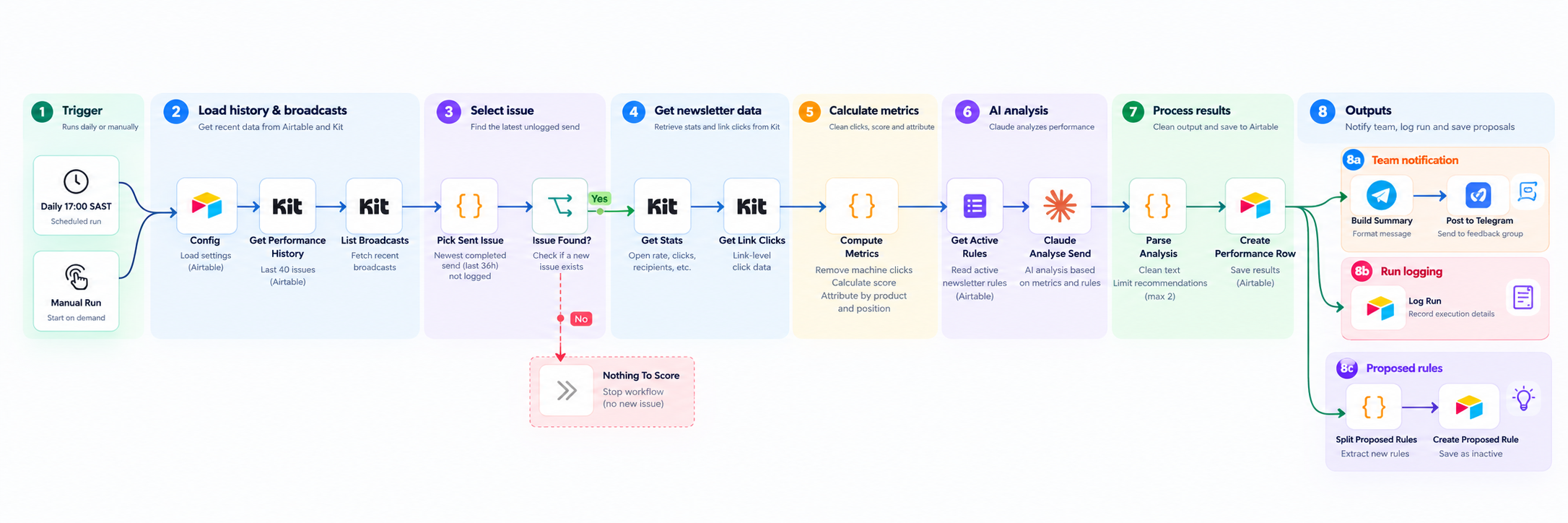
The workflow separates deterministic calculations from AI interpretation. Code handles the numerical metrics and data-quality flags, while Claude explains the results and proposes potential improvements.
Airtable serves as the historical record and source of active newsletter rules. Kit provides newsletter and performance data, and Telegram provides the team's concise reporting channel.
n8n work Flow:
06. Performance Scoring and Click Analysis
Machine-Click Adjustment
Email security gateways may automatically click links in a newsletter. This can create a flat plateau across multiple links, unlike the steeper click distribution that may be associated with genuine reader activity.
The workflow detects this plateau and subtracts the suspected machine traffic to calculate an adjusted click rate.
The supplied examples demonstrate the effect:
| Example | Raw click rate | Adjusted click rate |
|---|---|---|
| Historical issue example 1 | 7.73% | 2.63% |
| Historical issue example 2 | 6.64% | 2.54% |
| Clean issue | No specific figure supplied | Left unchanged |
These figures illustrate the adjustment logic. They do not establish an independently verified measure of human clicks; the adjusted figures remain dependent on the workflow's machine-traffic detection method.
Historical Baseline Scoring
Each issue is compared against the median open rate and click rate of past issues.
Segment sends with fewer than half the usual recipients are excluded from the baseline comparison. This helps prevent smaller, targeted sends from distorting comparisons with normal full-list newsletters.
A score of 1.00 represents performance at the established baseline.
Product and Position Attribution
The workflow groups clicks using two dimensions:
- Campaign tag: Identifies the associated product or campaign, with the date suffix removed so results can be compared over time.
- Slot tag: Identifies the position where a link appeared in the newsletter.
This structure supports analysis of which product campaigns attract interest and how newsletter placement relates to engagement.
Data-Quality Flags
The workflow flags conditions that may limit confidence in the analysis, including:
- Missing link-level click data.
- Segment sends.
- Links without a dated campaign tag.
These flags are passed to Claude so uncertainty can be reflected in the final report rather than hidden.
07. AI Analysis and Guardrails
Claude receives the calculated performance data and active newsletter rules from Airtable. Its task is to explain the results and identify potential improvements without overstating what the data supports.
Analysis Rules
- Use adjusted clicks as the primary measure: Raw clicks must not be presented as a performance win when they may contain machine traffic.
- Explain discrepancies: If raw and adjusted click rates tell different stories, the analysis must acknowledge the difference.
- Do not equate clicks with revenue: Sales cannot be measured by this workflow, so product-link clicks represent interest, not confirmed sales.
- Avoid duplicate recommendations: Existing active rules must not be proposed again.
- Require evidence: Each proposed rule must state the evidence supporting it.
- Allow no recommendation: Zero proposed rules is an acceptable outcome when the evidence is insufficient.
- Keep reports concise: The analysis is limited to two paragraphs, with no more than three recommendations. The Telegram summary must remain under 600 characters.
- Do not invent data: Claims must be grounded in the supplied statistics and context.
Human Approval Before Activation
The agent recommends; it does not make policy decisions.
Proposed rules are stored as inactive records in Airtable. A person must explicitly mark a proposal as Active before it can reach the newsletter writing prompts.
This keeps the workflow useful for analysis while preserving human control over changes to newsletter strategy.
08. Reporting and Data Management
The workflow creates a consistent reporting process across three connected outputs.
| Component | Purpose |
|---|---|
| Airtable Performance table | Stores issue statistics, score, analysis, and recommendations. |
| Telegram feedback group | Receives a short summary for the team. |
| Execution log | Records workflow runs for operational tracking. |
| Airtable Newsletter Rules table | Stores proposed rules as inactive until approved. |
The Kit broadcast ID and send date provide the issue-level identifiers used to prevent repeat scoring. The last 40 logged issues supply recent historical context, while active rules provide the current policy context for Claude.
09. Results and Metrics
The supplied workflow description documents the automation's capabilities and includes examples of machine-click adjustment. It does not provide a measured before-and-after evaluation of time saved, newsletter engagement improvement, recommendation adoption, or revenue impact.
Demonstrated Workflow Capabilities
- Daily and manual execution.
- Selection of eligible, previously unlogged newsletter issues.
- Retrieval of Kit statistics and link-level click data.
- Machine-click adjustment and historical baseline scoring.
- Product and position-level click attribution.
- Data-quality flags passed into the AI analysis.
- Structured Claude output and bounded recommendations.
- Airtable reporting, Telegram summaries, and execution logging.
- Human approval before proposed rules become active.
Example Metric Adjustment
The provided examples show raw click rates of 7.73% and 6.64% being adjusted to 2.63% and 2.54%, respectively, while a clean issue is left unchanged.
These are examples of the calculation behavior, not evidence of improved campaign performance.
Metrics to Measure Next
To evaluate business impact, a pilot should record:
- Time spent producing newsletter reports before and after automation.
- Percentage of eligible issues successfully scored.
- Frequency of missing or unverified link reports.
- Agreement between adjusted click estimates and a trusted validation sample.
- Frequency and quality of AI recommendations.
- Percentage of proposals approved by a human.
- Changes in engagement across subsequent issues, evaluated separately from the workflow's own scoring.
10. Key Takeaways
- Correct the data before interpreting it: Machine-generated clicks can make newsletter performance appear stronger than it is.
- Use an account-specific baseline: Comparing each issue with historical medians provides context beyond raw statistics.
- Keep calculations separate from AI analysis: Deterministic code handles metrics, while Claude interprets the prepared evidence.
- Carry uncertainty forward: Missing reports and questionable attribution are flagged rather than silently treated as verified.
- Keep recommendations evidence-based: The agent must explain its proposals and can return no recommendations when evidence is insufficient.
- Preserve human control: Proposed rules remain inactive until explicitly approved.
- Make reporting repeatable: Airtable, Telegram, and execution logs provide structured records for the team.
11. Future Development
The next stage should focus on validating the scoring method and measuring its operational value.
- Compare adjusted click rates with a manually reviewed sample to evaluate the machine-click detection method.
- Track report completion and data availability across eligible newsletter issues.
- Measure the time required to prepare reports manually versus using the workflow.
- Track which recommendations are accepted, rejected, or modified by the team.
- Evaluate subsequent newsletter engagement to determine whether approved recommendations are associated with meaningful improvements.
- Monitor cases where link-level data is missing or campaign and slot tags are incomplete.
12. Final Outcome
The Newsletter Performance Agent provides an automated process for selecting newly sent newsletter issues, calculating adjusted engagement metrics, comparing performance with historical benchmarks, and generating a concise AI analysis for the team.
By combining Kit, n8n, Airtable, Claude, and Telegram, the workflow turns newsletter reporting into a repeatable process with explicit data-quality flags, structured recommendations, and human approval controls.
The key distinction is that the system automates analysis and recommendation management; improvements in engagement, efficiency, and revenue still need to be validated through measured use.