From Manual Calendar Checking to Automatic Tutor Matching
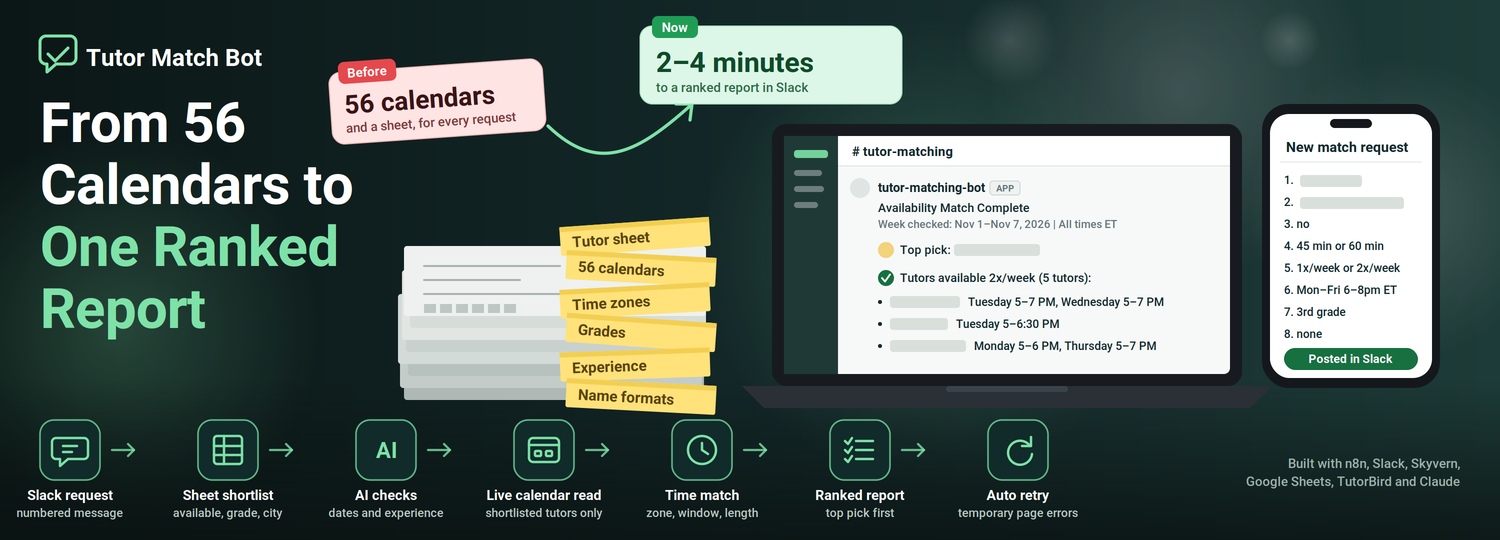
Finding the right tutor for a family used to mean checking the tutor sheet and then each tutor's calendar, one by one. Now a staff member posts the request in Slack, and a ranked list of tutors who are really free arrives in the same thread within minutes.
 n8n Automations
- n8n
- Slack
- Google Sheets
- Claude
From Manual Calendar Checking to Automatic Tutor Matching
- Browser automation
- n8n automations
- AI agents
Works with: n8n, Slack, Skyvern, Google Sheets, TutorBird, Claude
Before A tutor sheet and 56 separate calendars to check for every request
Now One ranked report in Slack, in about 2 to 4 minutes
Project overview
A tutoring company places children with tutors. For every family request, one question matters most: which tutors are free at the times this family needs, and right for this child?
Answering it means combining two sources: a tutor sheet (who is available now, where they work, which grades, what experience, how many students) and a separate calendar in TutorBird for each of 56 tutors.
Growlyze built a Slack bot that does this check. A staff member posts the request in a fixed numbered format. The bot shortlists the right tutors from the sheet, has a browser automation read their live TutorBird calendars, matches their free time to the family’s windows and session length, and replies in the same thread with a ranked report.
The bot also handles the family’s time zone, applies the company’s rule for how many sessions a week a tutor must cover, and says why a tutor is only a partial match.
Key results at a glance
| Metric | Before | After |
|---|---|---|
| Time to a match report | 6–8 minutes | 2–4 minutes |
| Calendars read per request | All 56 tutors | Only the shortlisted tutors (24 in the first live test) |
| Tutor information | A sheet plus 56 separate calendars | One ranked report in Slack |
| Name matching | Two name formats: “First Last” in the sheet, “Last, First” in TutorBird | All 34 tutors marked available matched to their TutorBird names |
| Temporary page errors | Re-run by hand | Retried automatically, up to 3 attempts |
Report times come from measured live runs (2:00 and 3:54). The calendar figure comes from the first live test, a remote request with 24 shortlisted tutors. No other numbers are claimed.
01. The business challenge
When a family asks for a tutor, speed and accuracy both matter. A family left waiting, or promised a time that can’t be kept, can lose trust quickly. Matching a request to the right tutor involves several connected problems.
1.1 Every request has many conditions
A match has to fit the child’s grade, any experience the family needs (such as ADHD or autism), a city or online, the session length (for example 45 or 60 minutes), how many sessions a week, and the family’s free windows in their own time zone. All of these have to be true at once.
1.2 The answers live in two places
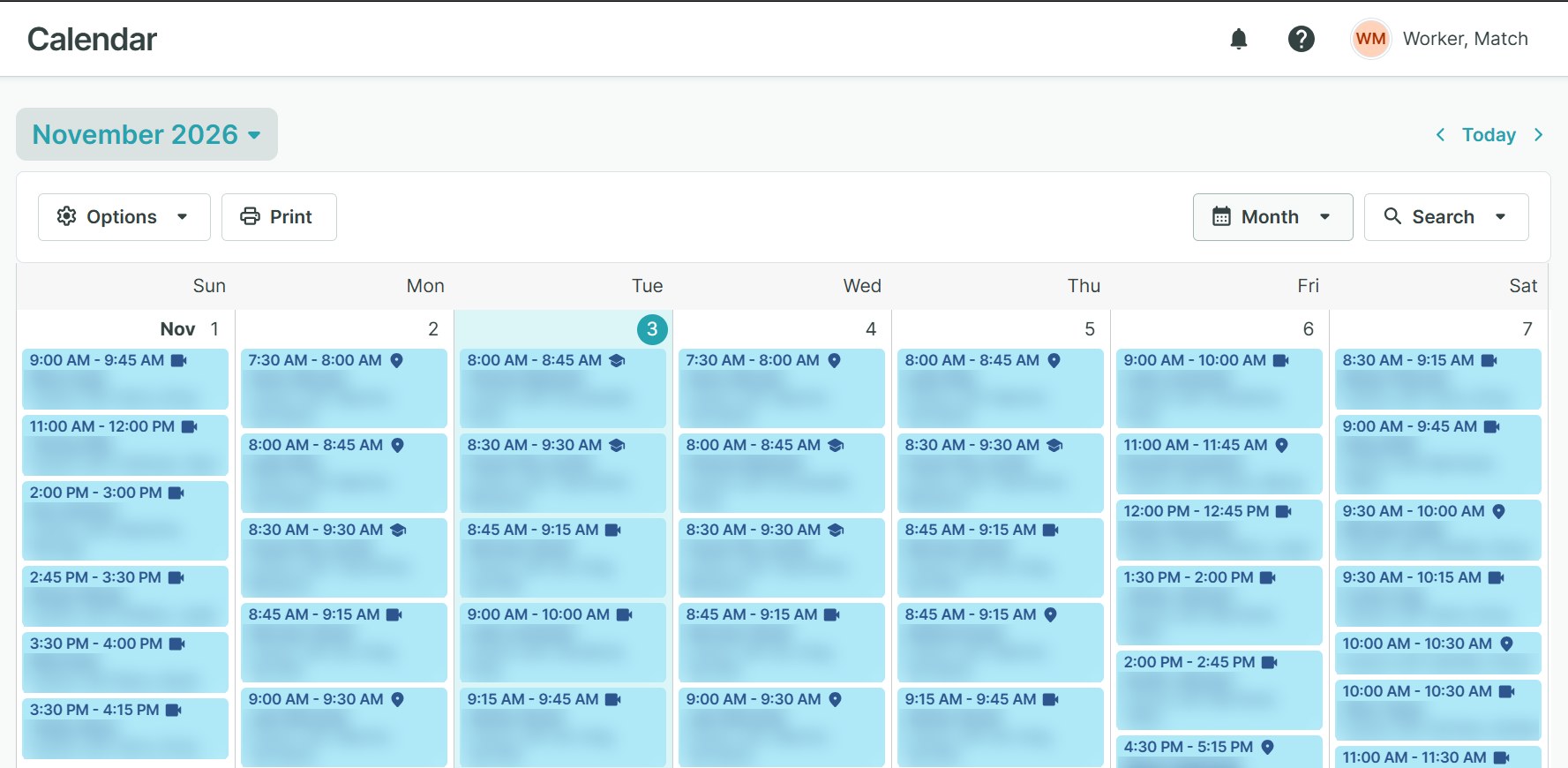
The tutor sheet says who is available now, where they work, which grades they teach, what experience they have and how many students they already have. Their actual free time sits in a separate TutorBird calendar for each of 56 tutors, which has to be opened through the website.
1.3 Time zones and names don’t line up
Families write their free times in their own zone (ET, MT, PT and others), while TutorBird shows times in Eastern. The sheet writes names as “First Last”, while TutorBird writes “Last, First”, and some names have a middle name or a two-word surname.
1.4 Free time isn’t always usable time
A tutor can be free for 30 minutes inside a family’s window when the session needs 45 or 60. A request for two sessions a week also needs two separate days, not one long gap.
1.5 A wrong match is costly
If a tutor looks free and isn’t, the family is promised a time that can’t be kept. A child waits longer for help, and the team has to start the search again.
02. The solution: a Slack tutor-matching bot
Growlyze built the bot around the company’s own tutor sheet, TutorBird calendars and Slack channel. It replaces none of them. It connects them, so one Slack message sets the whole check in motion.
2.1 A request in Slack
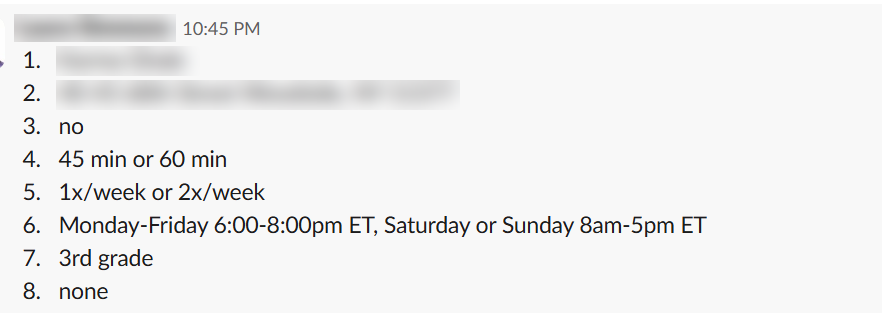
A staff member posts the request as eight numbered lines: student, remote or address, backup option, session length, how often, the family’s free times, grade, and any experience needed. The bot adds a “working on it” reaction and checks every line; if one is missing, it replies in the thread and says which. AI turns the days named in the request, even a range like Monday to Friday, into real dates for the upcoming Sunday-to-Saturday week.
2.2 A shortlist from the tutor sheet
The bot reads the tutor sheet and keeps tutors who are marked available now, work in the right city or remote, and teach the child’s grade. AI then checks which of them have the experience the family asked for, matching on meaning (“Autism” and “Autism Spectrum Disorder” count as the same condition) and requiring every condition named. For in-person requests, the bot also works out how far each tutor is from the family.
2.3 A live calendar read with Skyvern
The bot sends the dates and the shortlisted tutors, written the way TutorBird writes names, to Skyvern. Skyvern logs into TutorBird, selects those tutors and reads each tutor’s free times for the requested days from that tutor’s own calendar column. The workflow checks every 30 seconds until the read is done, and if TutorBird has a temporary page problem it retries up to two more times.
2.4 Matching free time to the family
AI turns the family’s free-text availability into clear day and time windows, including “either day” options. The bot matches sheet names to TutorBird names, converts times from TutorBird’s Eastern time into the family’s time zone, and keeps only the free time that fits a window and is long enough for the session length.
2.5 A ranked report in the same thread
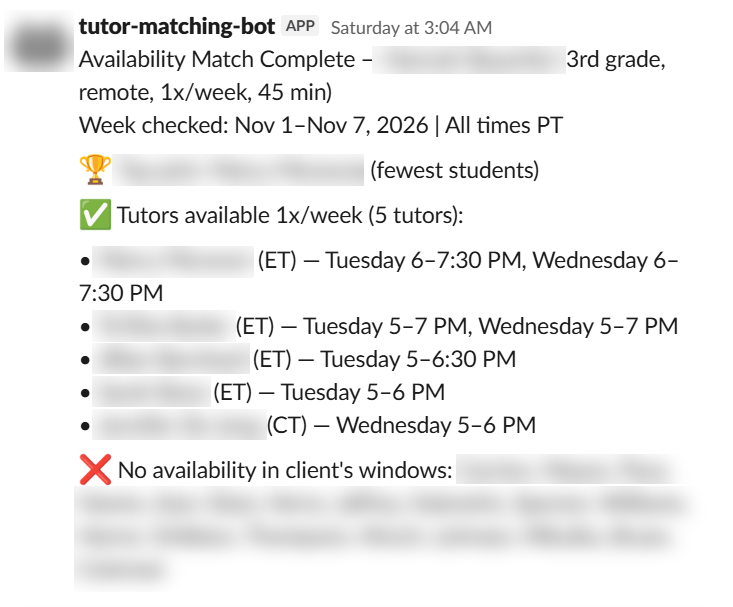
The bot then checks how many sessions a week each tutor can cover. Tutors who cover every requested session are full matches; those who cover fewer are partial matches, with the reason and any too-short slots listed; the rest are named as having no availability. The top pick is chosen from the full matches (closest for in-person requests, then fewest students), and remote backups are added when too few in-person tutors fit. The report is posted as a reply to the original message, with a check-mark reaction.
2.6 Clear failure messages
If a step fails, the bot replies in the thread with “Match failed for this request” and the reason, and marks the message with an X. Temporary calendar errors are retried first, so the team only sees an error when every attempt has failed.
03. End-to-end workflow
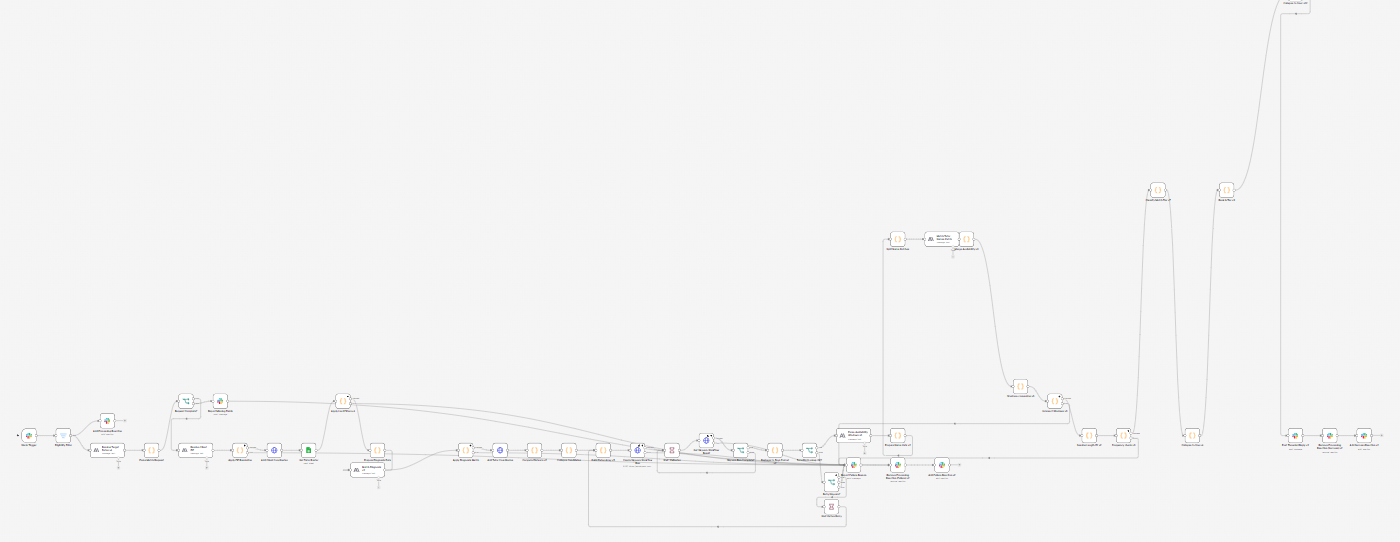
The whole process runs as one n8n workflow, started by the Slack message.
- Request posted in Slack
- Dates and fields read from the request
- Shortlist built from the tutor sheet
- Calendars read by Skyvern, with automatic retry
- Free time matched to the family’s windows and session length
- Weekly frequency checked and tutors sorted
- Top pick chosen
- Report posted in the same thread
There is one path from the Slack message to the posted report, and any failure is reported back to the same thread.
04. What makes this solution different?
Built around the company’s own rules
The bot uses the company’s grade bands, experience matching and student counts. When a family accepts “1x or 2x a week”, a full match must cover the higher number, so tutors who can only do one session show as partial.
Reads only the tutors who could match
The sheet filters run first, and only the shortlisted tutors’ calendars are read. In the first live test that was 24 tutors instead of all 56.
AI where judgment is needed, fixed rules where precision is needed
AI reads the family’s free-text availability and matches experience and names. Time-zone conversion, overlap, session-length checks and sorting follow fixed rules.
Partial matches explain themselves
Every partial match says why it falls short (for example, one session of two) and lists any slots that were too short for the session.
Each tutor is read from their own column
Skyvern takes each tutor’s availability from that tutor’s own calendar column, and the read is set up to check that the number of tutors matches the number of columns.
Temporary errors fix themselves
If TutorBird has a temporary page problem, the bot retries up to two more times before showing an error.
05. Business impact
Match reports in 2–4 minutes
Measured live runs finished in 2:00 and 3:54. Before tuning, matches had slowed to 6–8 minutes; removing an unused calendar-read step and checking for results every 30 seconds instead of every 2 minutes brought them back down.
Fewer calendars to read
Only the shortlisted tutors’ calendars are read. In the first live test, that was 24 tutors instead of all 56.
Less manual re-running
Temporary TutorBird page errors used to mean re-running the request by hand. The bot now retries up to two more times on its own. This has been tested with simulated failures, and the first live retries are still to be observed.
Clearer shortlists
Each report names the full matches, the partial matches with the reason, and the tutors with no availability, so the team can see why someone was or wasn’t suggested.
Accuracy checked by hand
In two test requests, all 21 and all 24 tutors in the reports were checked against the raw calendar data and the tutor sheet, and every time range and experience label matched. All 34 tutors marked available in the sheet matched their TutorBird names.
06. Technology stack
| Technology | Role in the solution |
|---|---|
| n8n | Workflow automation: runs every step, from request to report |
| Slack | Where requests are posted and where the report is replied |
| Skyvern | Browser automation: logs into TutorBird and reads the tutors’ free times |
| TutorBird | The calendar system the team already uses |
| Google Sheets | The tutor roster: availability, location, grades, experience, student count |
| Claude (Anthropic) | AI for dates, free-text availability, experience matching, name matching and ZIP estimates |
| Zippopotam.us | Turns ZIP codes into locations for distance checks |
The technologies support the bot’s main functions: request intake, shortlisting, calendar reading, matching and reporting. The team keeps working in Slack, TutorBird and their own tutor sheet.
07. Future enhancements
The following items were identified as future improvements rather than completed capabilities.
Warn when a tutor can’t be found in TutorBird
Today a tutor the calendar reader can’t find shows up as having no availability. The report should say “not found” instead.
Refresh and retry inside the calendar reader
Retrying inside the Skyvern run itself would let a temporary page error recover in seconds, instead of starting the whole read again.
An error message for every failed step
Some steps, such as the AI steps, don’t report a failure to Slack. Adding that would make sure no request is ever left without a reply.
08. Where this pattern applies
This isn’t really about tutoring.
Worked example: a home care agency. A family asks for a caregiver who speaks Spanish, lives nearby, and is free Tuesday and Thursday afternoons. The sheet shortlists caregivers who are active, certified and in the right area. A browser bot reads only those caregivers’ schedules in the scheduling system, keeps the ones free at the family’s times, and posts a ranked list in Slack.
Where else it fits:
- Salons and spas: stylist to appointment
- Field service: technician to job
- Clinics: provider to patient visit
- Fitness and coaching: trainer to member
- Language services: interpreter to event
- Legal and accounting: advisor to client intake
The shape: a request comes in, a sheet shortlists who qualifies, a browser bot reads the live calendars, and a ranked answer lands where the team already works.
What changes from case to case: the filters in the sheet, the calendar system being read, and the rules for what counts as a match.
Conclusion
Matching a family to a tutor depends on a tutor sheet and 56 separate TutorBird calendars, each with its own times, time zones and name formats.
Growlyze connected them with a Slack bot that shortlists tutors from the sheet, reads the shortlisted tutors’ live calendars, converts times to the family’s zone, and replies with a ranked report that explains every partial match.
Measured reports arrive in 2–4 minutes, and temporary calendar errors are retried automatically. The team keeps using Slack, TutorBird and their own tutor sheet.