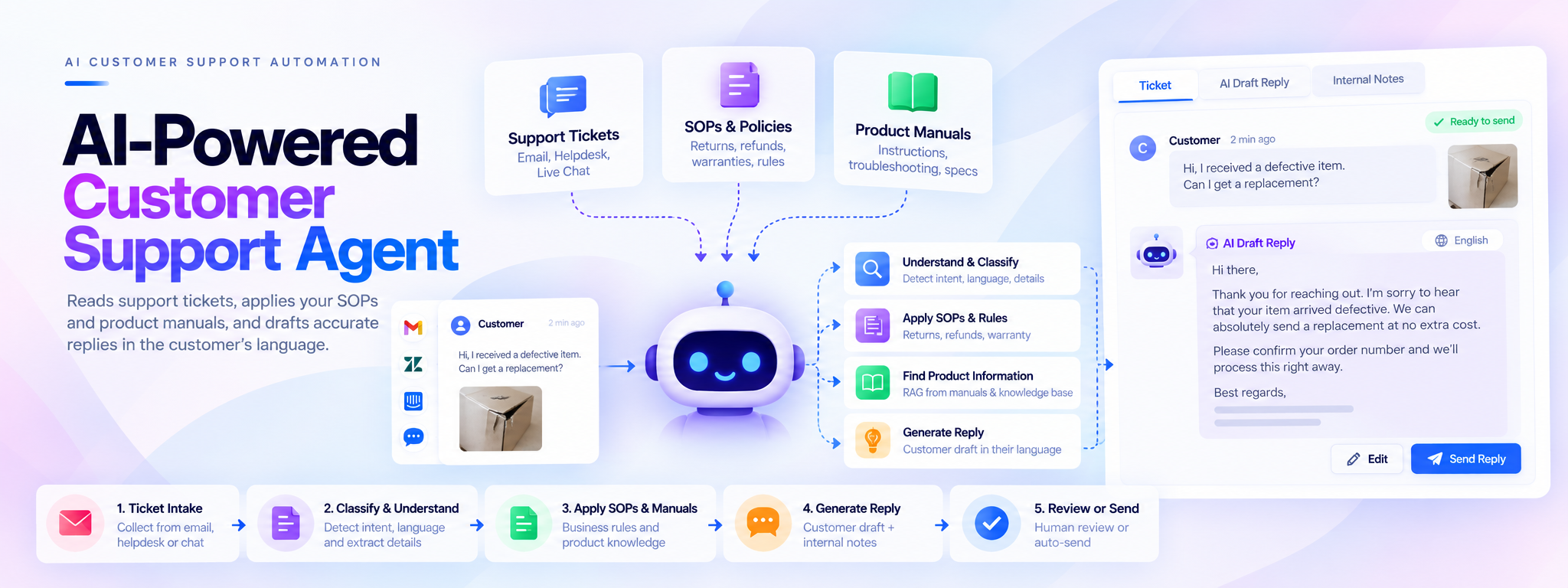
AI-Powered Customer Support Agent
An AI agent that reads support tickets, applies your SOPs and product manuals, and drafts accurate replies in the customer’s language.
- n8n
- Zapier
- PostgreSQL
- Supabase
- Google Sheets
- OpenAI
AI-Powered Customer Support Agent
An AI agent that reads support tickets, applies company SOPs and product manuals, and drafts accurate responses in the customer's language.
Technologies: n8n, Zapier, PostgreSQL, Supabase, Google Sheets, OpenAI
Project Overview
Customer support teams often spend significant time reading long ticket conversations, searching through standard operating procedures (SOPs), reviewing product manuals, and preparing responses to routine customer questions.
This project introduces an AI-powered customer support agent designed to automate these repetitive tasks. It classifies incoming tickets, retrieves relevant policies and product information, applies business rules, and generates customer-ready response drafts alongside internal support notes.
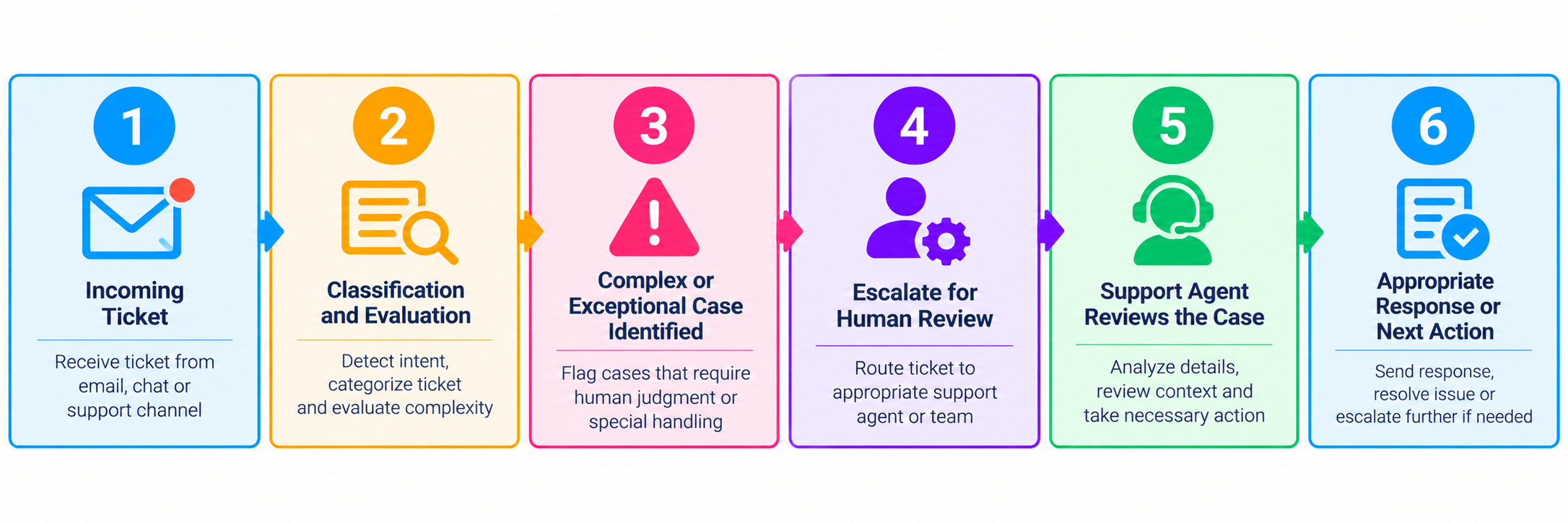
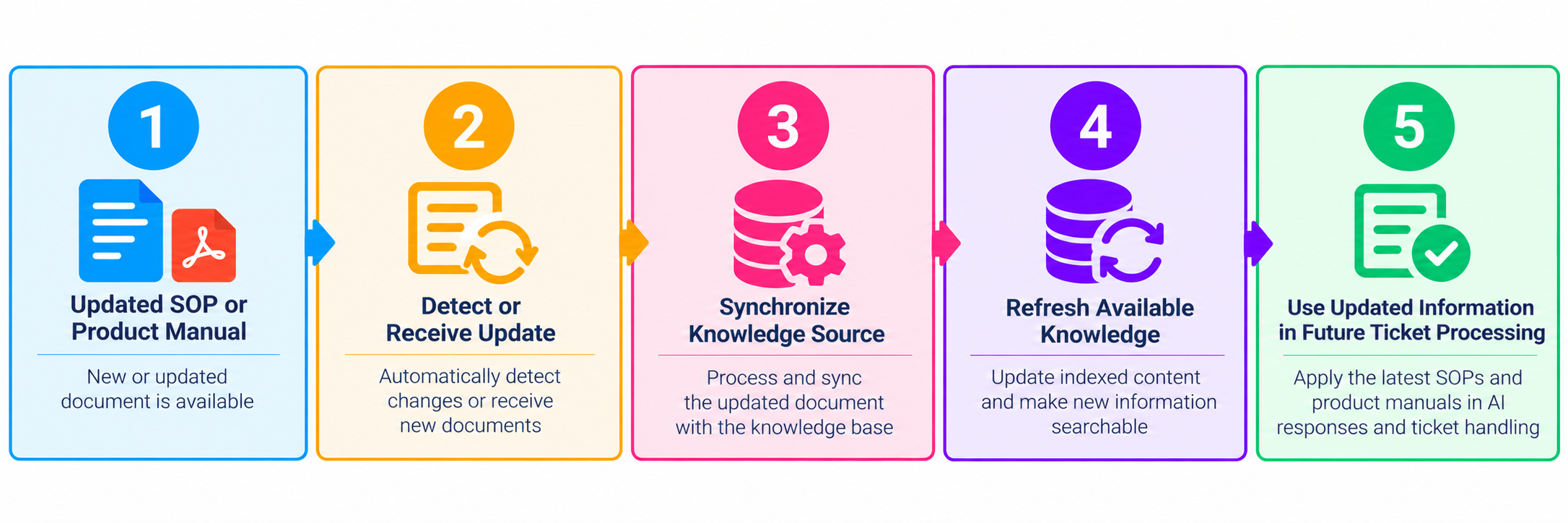
The system also supports ongoing knowledge synchronization so that responses can reference current SOPs and product documentation. Complex or exceptional cases can be escalated for human review.
01. The Problem: Manual Customer Support Doesn't Scale
Before automation, support teams faced several operational challenges.
Time-consuming manual research
Agents had to read lengthy tickets and conversation threads, then switch between multiple sources to find the information needed to respond correctly.
- SOP documents and internal policy guides
- Product manuals and troubleshooting instructions
- Order details and purchase information
- Warranty, return, and refund conditions
Inconsistent decision-making
Different agents could interpret the same policy differently, particularly when handling returns, refunds, warranty claims, missing items, defective products, and payment issues.
Outdated knowledge
When product manuals or SOPs changed, agents could unknowingly rely on outdated information, increasing the risk of incorrect responses.
Operational impact
These challenges resulted in:
- High manual workload for support agents.
- Inconsistent, non-standard customer responses.
- Longer response and resolution times.
- More effort required to onboard new agents.
- Difficulty scaling support as ticket volumes increased.
Core challenge: The business already had the necessary knowledge, but needed a system to retrieve, apply, and use it consistently across support tickets.
02. The Solution: AI-Powered Customer Support Agent
The solution acts as a virtual senior support agent that combines ticket understanding, policy-based decision-making, product knowledge retrieval, and response drafting.
What the system does
- Reads incoming tickets and their conversation history.
- Understands customer intent and identifies the ticket category.
- Detects the customer's language and relevant case details.
- Retrieves applicable SOPs and product manuals.
- Applies configured business rules for returns, refunds, warranties, and other support cases.
- Drafts customer replies in a clear, friendly tone.
- Generates internal support notes explaining the relevant policy or manual and suggested next steps.
- Escalates complex or exceptional cases for human review.
- Supports synchronization of updated SOPs and product documentation.
The objective is to automate routine research and drafting while preserving human oversight where needed.
03. How the System Works: Six-Phase Workflow
Phase 1 — Ticket Intake and Understanding
The process begins when a new customer support ticket arrives.
The AI system:
- Reads the full conversation and available ticket context.
- Identifies the customer's intent and primary concern.
- Detects the language used by the customer.
- Checks whether the ticket appears valid or is potentially spam.
- Records incoming ticket information temporarily so that it can be processed without being lost.
Output: A ticket prepared for classification, with its conversation context available for subsequent processing.
Phase 2 — Smart Ticket Classification
The system identifies the type of support request and extracts relevant details.
Ticket categories include:
- Product usage and troubleshooting
- Warranty claims
- Return requests
- Refund requests
- Missing or defective items
- Order-status questions
- Payment issues
Relevant details may include:
- Order ID
- Product SKU
- Purchase date
- Ticket urgency
- Customer's specific question or reported problem
Based on the identified category and available details, the workflow determines which SOP or product manual is relevant.
Output: A categorized ticket with extracted information and a defined knowledge-retrieval path.
Phase 3 — SOP-Driven Decision-Making
The system applies the company's documented procedures and configured business rules to the ticket.
Rules may cover:
- Warranty eligibility and conditions
- Return eligibility
- Refund conditions
- Price-based thresholds
- Other configured support policies
Instead of generating decisions solely from general AI knowledge, the workflow uses the relevant company rules to guide its response.
For example, a refund-related ticket can be evaluated against the applicable refund conditions before a response draft is generated.
Output: A proposed support decision grounded in the applicable SOPs and business rules.
Phase 4 — Product Manual Intelligence (RAG)
For product-specific questions, the system retrieves relevant information from product manuals and the knowledge base using retrieval-augmented generation (RAG).
The retrieval process supports questions involving:
- Product instructions and usage
- Product specifications
- Troubleshooting steps
- Product-specific guidance
The retrieved information provides context for the AI response, helping it address the customer's actual question rather than relying only on a general model response.
The knowledge-update component is intended to keep product information and SOPs synchronized as documentation changes.
Output: Relevant product information and policy references for the response-generation stage.
Phase 5 — Response Drafting
After the ticket has been classified and the relevant policies and product information have been retrieved, the AI generates two outputs.
A. Customer reply draft
- Friendly, professional tone
- Clear explanation of the proposed answer or next steps
- Written in the customer's detected language
- Based on the applicable SOPs and retrieved product information
- Ready for support-agent review or sending according to the configured workflow
B. Internal support notes
- Explanation of the proposed response
- Relevant SOP or product manual used
- Key information considered during processing
- Suggested next steps for the support team
These two outputs serve different purposes: the customer receives a clear response, while the support team receives context to help review the proposed answer.
Phase 6 — Continuous Knowledge Updates
The system includes a knowledge-maintenance component designed to keep support information current.
The intended process includes:
- Monitoring product manuals for updates.
- Synchronizing SOP changes.
- Removing or replacing outdated information.
- Keeping the knowledge base aligned with current documentation.
This helps reduce the risk of responses relying on obsolete policies or product instructions.
Output: A knowledge base that can be maintained as product documentation and company procedures evolve.
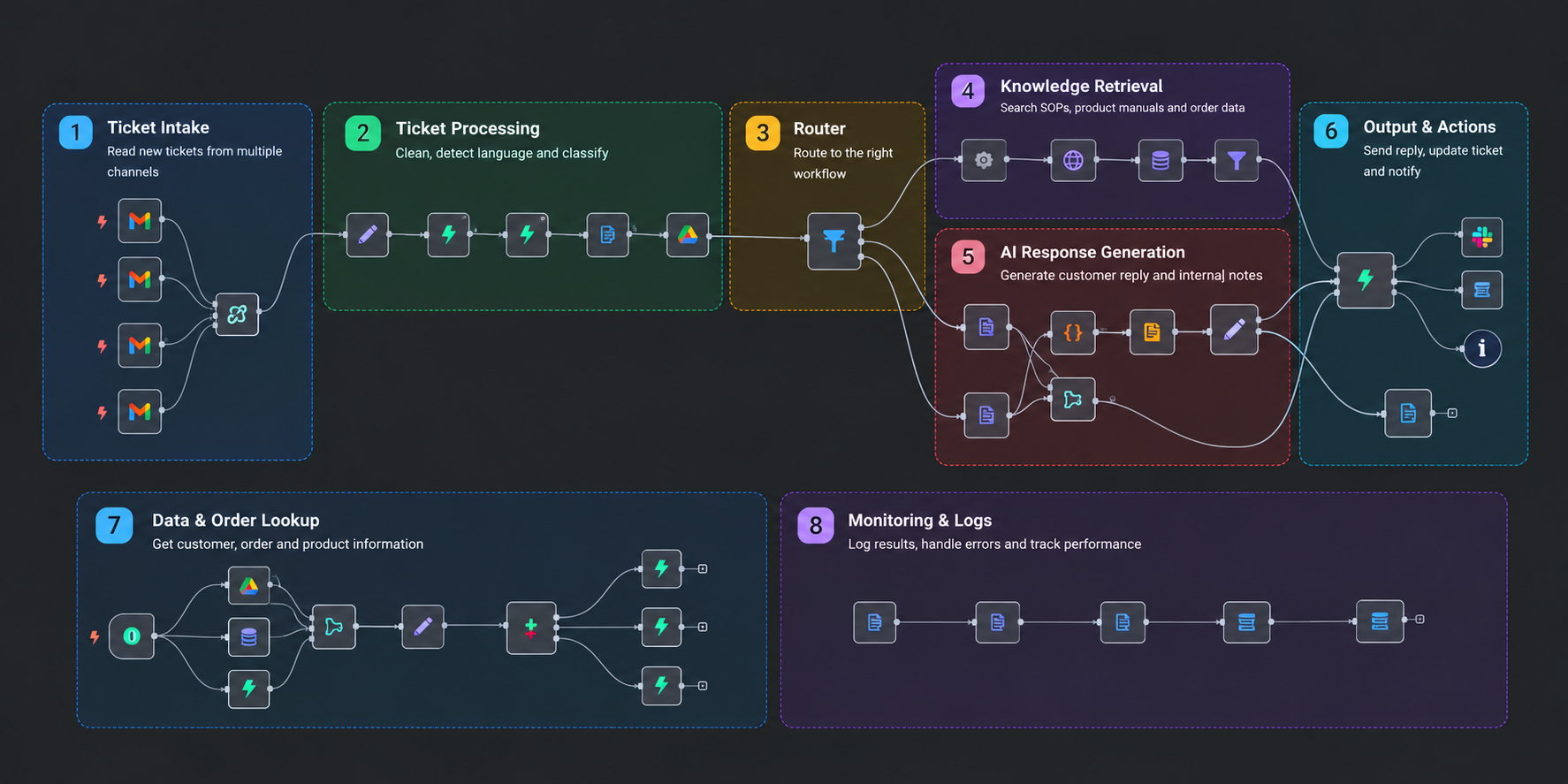
04. Complete System Workflow
Main ticket-processing workflow
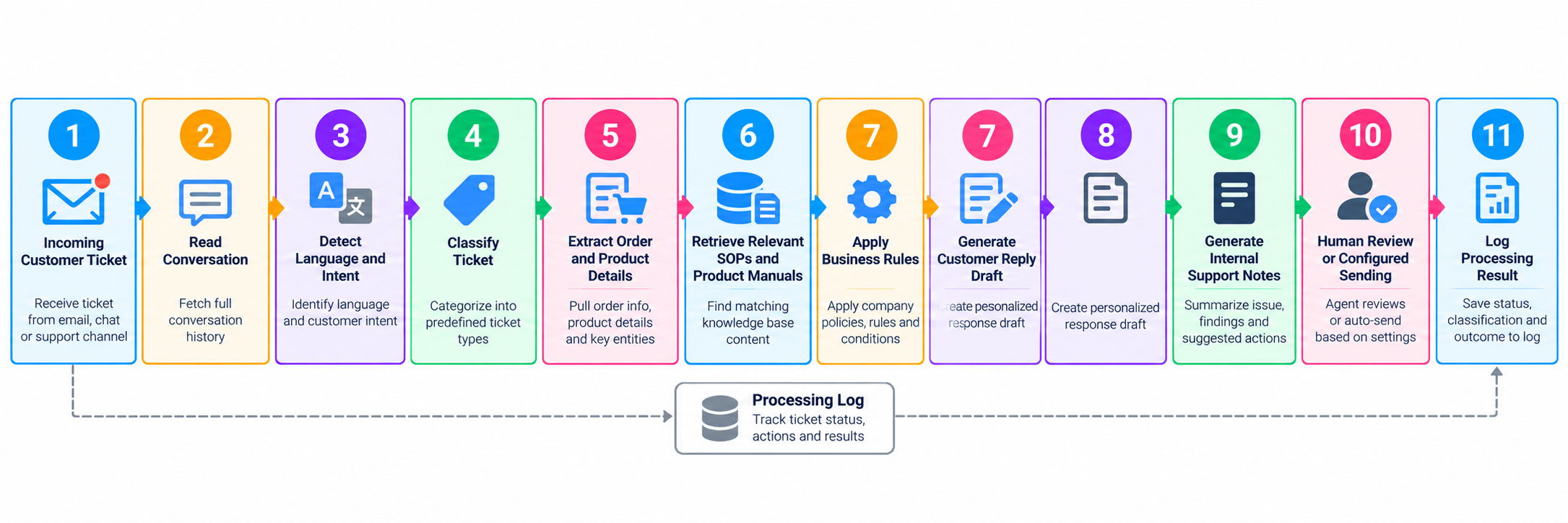
Knowledge retrieval workflow
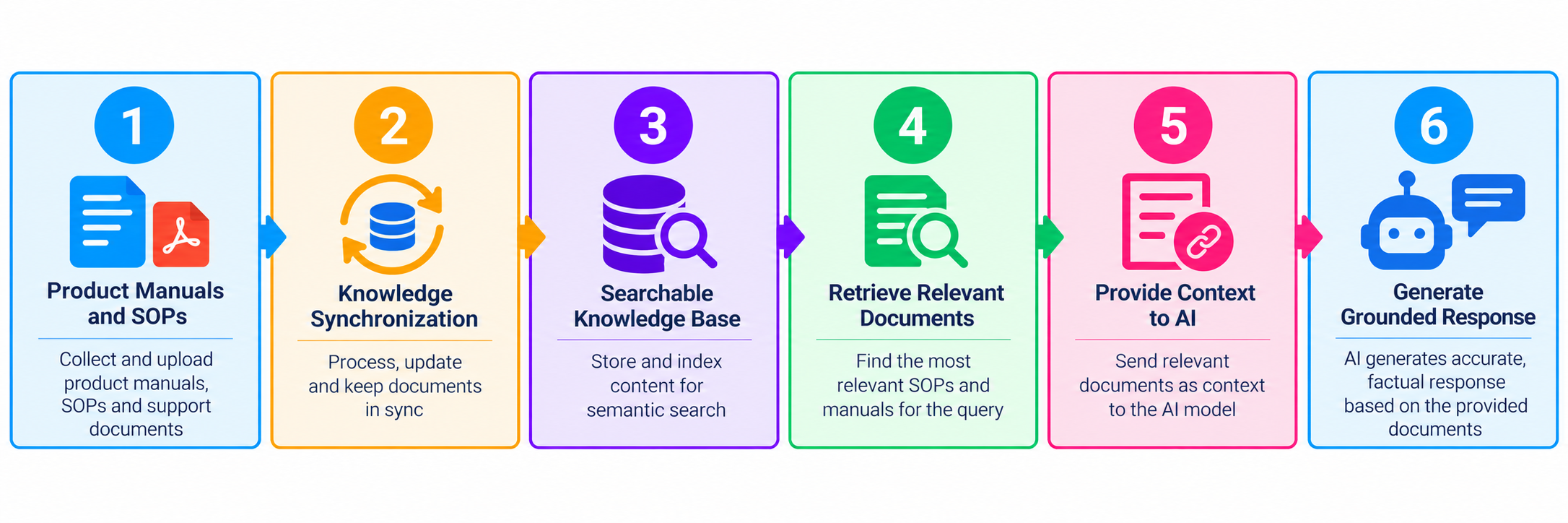
Exception-handling workflow
Knowledge maintenance workflow
05. Business Value
Reduced manual research
Agents spend less time searching through lengthy SOPs, manuals, and conversation histories to prepare routine responses.
Consistent policy application
Configured business rules and relevant SOPs guide responses across return, refund, warranty, and other support categories.
Faster response preparation
The system automates ticket understanding, knowledge retrieval, and initial response drafting, helping support teams prepare replies more quickly.
Multilingual support
Customer response drafts can be generated in the language detected in the incoming ticket.
Better knowledge reuse
Existing product documentation and company procedures become reusable sources of context for support requests rather than requiring agents to locate and interpret the same information repeatedly.
Improved agent confidence
Internal support notes explain the basis of a proposed response and identify the relevant policy or manual, giving agents useful context for review.
Support scalability
Automating repetitive work can help teams handle larger volumes of routine requests without increasing manual research effort at the same rate.
06. Results and Expected Impact
The original case study reports the following figures and expected benefits.
Time and effort savings
| Metric | Reported figure |
|---|---|
| Routine tickets handled before automation | 50–100 per day |
| Time spent reading manuals and drafting replies before automation | Approximately 2–4 hours per day |
| Human time required after automation | Approximately 10–15 minutes |
| Monthly time saved per team | Approximately 50–60 hours |
| Equivalent support capacity freed | Approximately 1–1.5 full-time support agents |
Accuracy and consistency goals
The case study describes the intended benefits as:
- Consistent application of configured SOP rules.
- More relevant answers to product-specific questions.
- Reduced human error and knowledge drift.
- Fewer manual policy lookups.
- More consistent response preparation.
Cost efficiency
The original case study estimates AI costs at approximately $30–40 per month per agent workflow. Actual costs depend on model usage, ticket volume, retrieval infrastructure, and the deployed integrations.
Important: These metrics are reported in the supplied project description and have not been independently verified. The expected benefits should not be interpreted as guaranteed outcomes for every deployment.
07. How to Replicate This System
The supplied case study describes a workflow-based implementation using an automation platform, an AI model, and a knowledge source.
Step 1 — Prepare the workflow
- Open the workflow automation platform used for the project, such as n8n or Zapier.
- Create a new workflow.
- Import the supplied
Customer support Agent.jsonworkflow file, if available and compatible with the platform. - Review the imported nodes, connections, and configuration.
- Save the workflow with a suitable name.
Step 2 — Connect the ticket platform
Configure the relevant ticket-platform integration.
- Enable the appropriate new-ticket event or webhook.
- Configure the endpoint that forwards new ticket information to the workflow.
- Ensure the workflow receives the ticket content and any required metadata.
- Test that incoming tickets reach the correct workflow entry point.
The exact configuration depends on the ticket platform and the available API or webhook integration.
Step 3 — Configure the knowledge base
Choose the knowledge source used for SOPs, product manuals, and supporting documents.
The original case study lists:
- Google Sheets
- PostgreSQL
- Supabase
Configure the required connection and organize the relevant support documentation. If the implementation uses RAG, ensure the retrieval and indexing components are configured for the selected knowledge source.
Step 4 — Connect the AI model
Configure the OpenAI model credentials and the workflow components responsible for:
- Ticket classification
- Intent and detail extraction
- SOP-based reasoning
- Product information retrieval and response generation
- Customer reply drafting
- Internal support notes
Use clear instructions that require responses to follow the retrieved information and configured business rules.
Step 5 — Configure business rules and escalation
Define the policies that determine how common support categories should be handled.
Examples include:
- Return eligibility
- Refund conditions
- Warranty requirements
- Price-based thresholds
- Conditions requiring human review
Confirm that exceptional cases are routed appropriately rather than being treated as routine requests.
Step 6 — Test the workflow
Submit test tickets covering different scenarios.
Verify that:
- Ticket ingestion works correctly.
- Classification and detail extraction produce the expected results.
- The appropriate SOPs and product manuals are retrieved.
- Business rules are applied as configured.
- Customer reply drafts appear in the expected format and language.
- Internal support notes contain useful context.
- Ticket data and processing results are logged correctly.
- Errors, missing information, and exceptional cases are handled appropriately.
Test return, refund, warranty, product troubleshooting, and other relevant scenarios before enabling live processing.
Step 7 — Activate and monitor the workflow
Once the workflow has passed testing:
- Enable the workflow.
- Monitor its initial runs.
- Review generated drafts and escalation behavior.
- Check that knowledge updates are reflected in subsequent processing.
- Investigate failed runs and adjust the configuration as needed.
From that point, supported tickets can be processed automatically according to the configured workflow, with human review or sending behavior determined by the deployment.
08. Final Outcome
The AI-Powered Customer Support Agent brings ticket understanding, policy retrieval, business-rule evaluation, product knowledge, and response drafting into a unified workflow.
By automating routine research and preparing customer-ready drafts, the system is designed to reduce repetitive work, improve consistency, and help support teams respond more efficiently. Its knowledge-maintenance and escalation components also support ongoing documentation updates and human handling of complex cases.
The result is a more structured approach to customer support in which AI handles repetitive processing while the support team retains visibility into the policies, information, and next steps behind each proposed response.