ClickUp Structure: Taraki Staffing Company
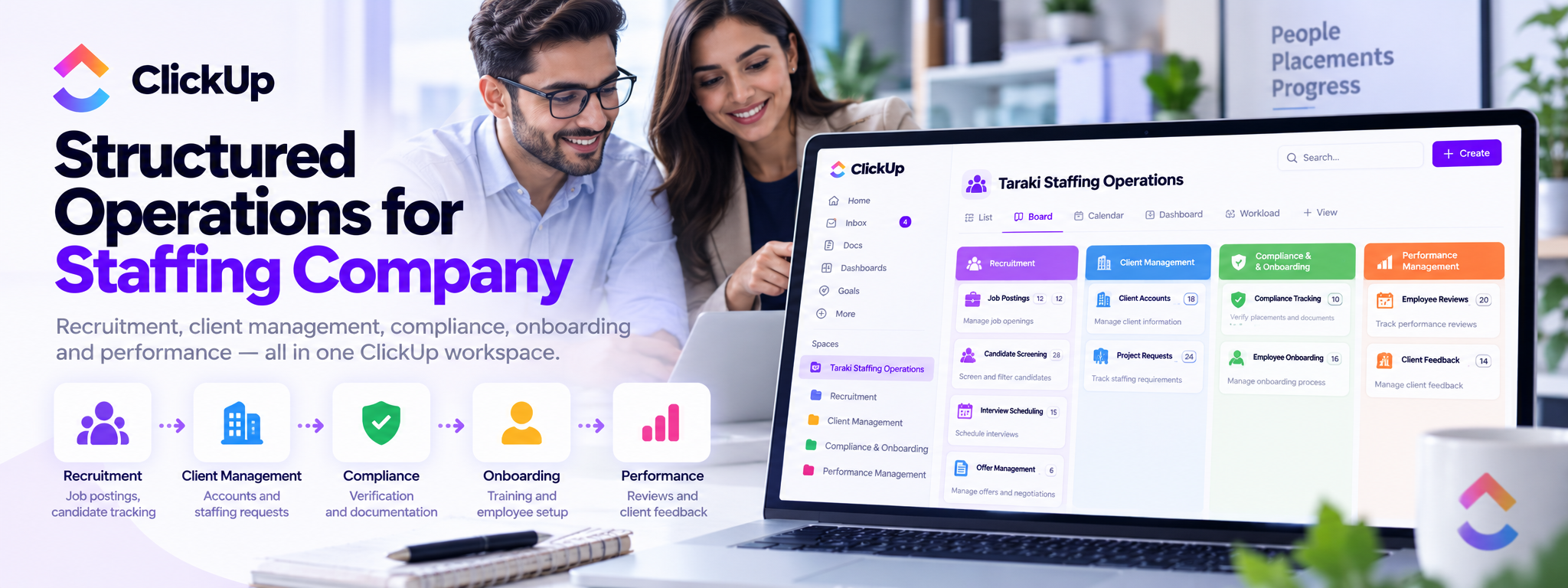
Detailed ClickUp workspace structure for a staffing company’s operations.
 ClickUp Setups
- ClickUp
01. Project Overview
This project organizes Taraki Staffing Company's operations into a structured ClickUp workspace. The workspace centralizes recruitment activities, client accounts, staffing requests, compliance tracking, onboarding, and performance reviews.
The setup uses dedicated folders, lists, custom fields, and automation rules to help teams manage tasks consistently and track work throughout the staffing lifecycle.
02. The Challenge
Staffing companies coordinate multiple interconnected processes, from publishing job openings and screening candidates to managing client requirements and onboarding placements.
Without a structured workspace, teams can face challenges such as:
- Recruitment tracking: Keeping job postings, candidate screening, interviews, and offers organized.
- Client coordination: Managing client accounts, staffing requests, and contract reviews.
- Compliance management: Tracking required checks and resolving outstanding compliance issues.
- Employee onboarding: Coordinating documentation, training, and onboarding tasks.
- Performance monitoring: Scheduling employee reviews and following up on client feedback.
03. The Solution
A dedicated ClickUp workspace structure was designed around five operational areas:
Recruitment
Manages job openings and the candidate journey from initial screening through interview scheduling and offer management.
Client Management
Centralizes client account information, staffing requests, service agreements, and account review activities.
Compliance and Onboarding
Tracks placement compliance requirements, employee documentation, training schedules, and onboarding progress.
Performance Management
Organizes employee performance reviews, feedback, improvement plans, and client satisfaction follow-ups.
04. Workspace Structure
Main Folder: Taraki Staffing Operations
A. Recruitment
- Job Postings: Tracks job ID, role title, department, status, posting date, location, salary range, and job description.
- Candidate Screening: Records candidate details, screening outcomes, resumes, and screening notes.
- Interview Scheduling: Manages interview dates, interviewers, formats, notes, and follow-up requirements.
- Offer Management: Tracks offer dates, acceptance status, start dates, salary, benefits, and offer details.
B. Client Management
- Client Accounts: Stores company details, contacts, service-level agreements, account managers, and review dates.
- Project Requests: Tracks staffing requirements, urgency, fulfillment status, and expected completion dates.
C. Compliance and Onboarding
- Compliance Tracking: Records placement IDs, compliance checklists, verification dates, outstanding issues, and resolution status.
- Employee Onboarding: Manages onboarding dates, required documents, training schedules, completion status, and assigned mentors.
D. Performance Management
- Employee Reviews: Tracks review periods, performance scores, feedback, improvement plans, and reviewers.
- Client Feedback: Records feedback dates, satisfaction levels, comments, and follow-up actions.
05. Automation and Workflow Rules
ClickUp automation rules support the processes defined within each list.
- Recruitment: Notify the team when jobs are posted, send alerts when statuses change, remind recruiters about overdue vacancies, and initiate onboarding tasks after offer acceptance.
- Client Management: Schedule quarterly account reviews, remind account managers about contract renewals, and flag urgent staffing requests.
- Compliance and Onboarding: Create compliance tasks for new placements, flag unresolved issues, and notify teams when onboarding remains incomplete.
- Performance Management: Remind reviewers about pending assessments, schedule future reviews, and create follow-up tasks based on employee or client feedback.
These rules are designed to reduce repetitive coordination and make task ownership and progress easier to track.
06. End-to-End Workflow
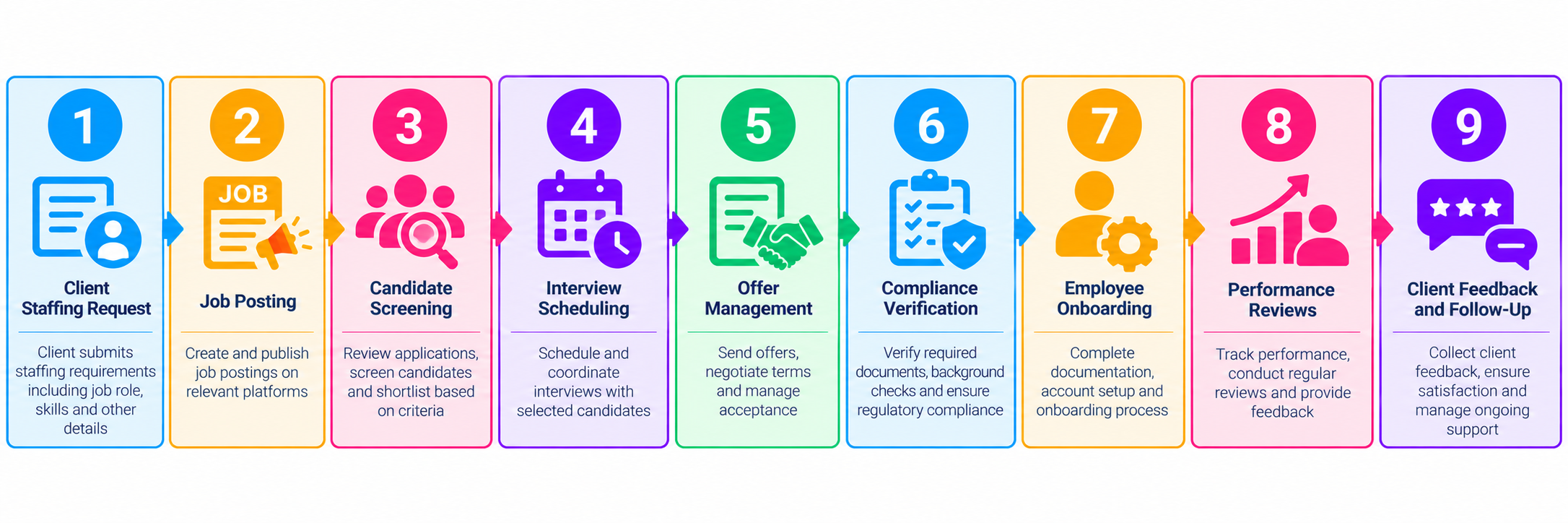
This workflow connects the major stages of staffing operations, from the initial client requirement through placement, onboarding, and ongoing performance management.
07. Key ClickUp Features
- Custom Fields: Capture structured information specific to each operational process.
- Dedicated Lists: Separate recruitment, client management, compliance, onboarding, and performance activities.
- Status Tracking: Make task progress and outstanding work visible.
- Automation Rules: Trigger reminders, notifications, and follow-up tasks based on configured conditions.
- Centralized Workspace: Keep staffing operations organized within one ClickUp structure.
08. Expected Business Value
The workspace is designed to support:
- Better visibility into recruitment and staffing requests.
- More consistent candidate and placement tracking.
- Improved coordination between recruitment and account management.
- Clearer oversight of compliance and onboarding requirements.
- More organized employee reviews and client feedback.
- Less repetitive manual follow-up through configured automation rules.
09. Conclusion
The Taraki Staffing Company ClickUp setup provides a structured foundation for managing staffing operations in one workspace. By combining dedicated lists, custom fields, status tracking, and automation rules, the system helps teams coordinate recruitment, client relationships, compliance, onboarding, and performance management more consistently.