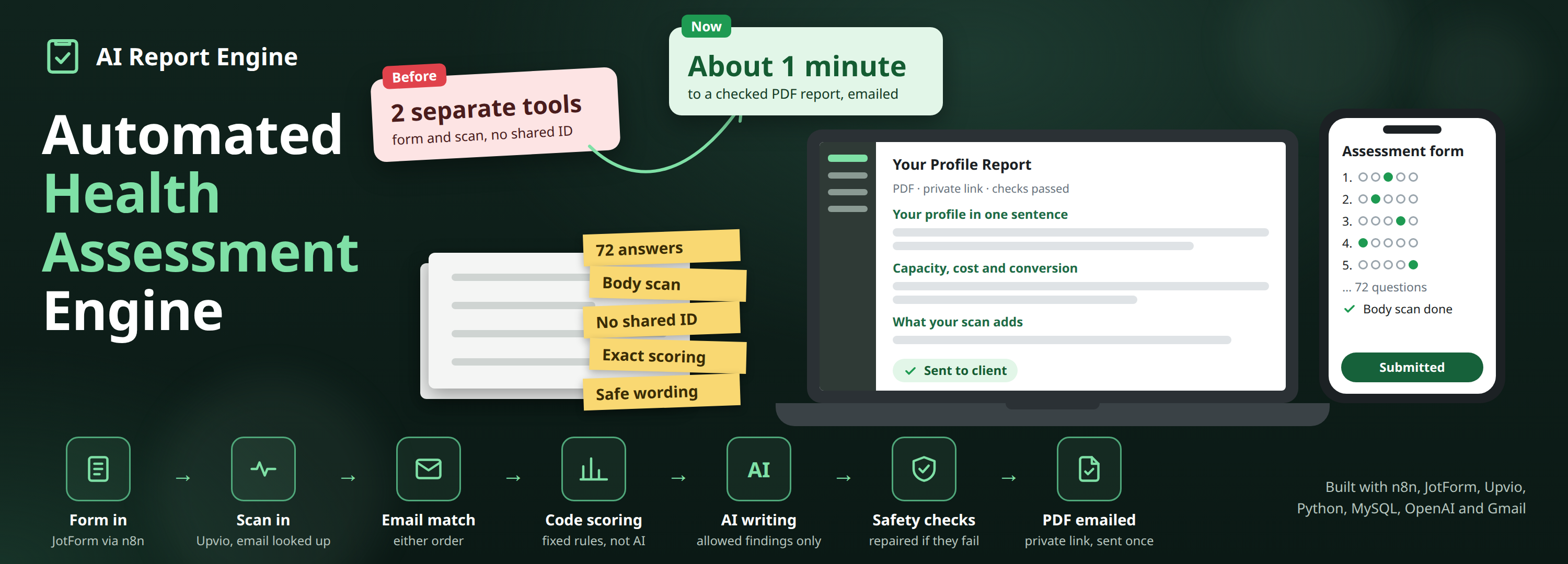
Automated Health Assessment Engine
 n8n Automations
 Python Automation
- n8n
- Gmail
- Python
- OpenAI
Overview
A health and wellbeing company sells an ADHD profile assessment. It is not a diagnosis and not a single “mild to severe” score. It shows how a person’s attention, drive, ideas, order, recovery and body work together, and it gives strengths and difficulties equal weight.
Each client completes a 72-question form in JotForm and a short camera body scan in Upvio. Before, the answers and the scan sat in those two tools with nothing joining them and nothing turning them into the personal report the company promises.
Now an assessment engine built by Growlyze, with three n8n workflows around it, matches each form to its scan, scores the answers in code, has AI write the report within strict limits, checks every part before publishing, and emails the client a private link to their PDF.
The Problem
People taking an ADHD assessment are often anxious about what it will say. They have paid for something personal, and a careless report can hurt them.
Two tools, no shared ID. The form and the scan arrive separately, at different times and in either order. Upvio’s scan notification does not even include the client’s email, so someone would have to pair every form with its scan by hand.
The scoring has to be exact. The 72 answers feed 11 dimensions, scoring bands, nine operating profiles, a seven-day experiment and product-suitability rules. The same answers must always give the same result, which an AI model cannot guarantee on its own.
The words have to be safe. The report must use the client’s own words in British English, but never claim a diagnosis or a cause, never mention brain chemicals or medication changes, and never show raw scores or question numbers. A short scan shows how the body was working at that moment; it must not be read as “how much ADHD” someone has.
Nothing can be lost or mixed up. Webhooks get sent twice, the AI service can be slow or down, and many clients can finish at once. Every accepted assessment still has to end in one report, sent once, to the right person.
How It Works
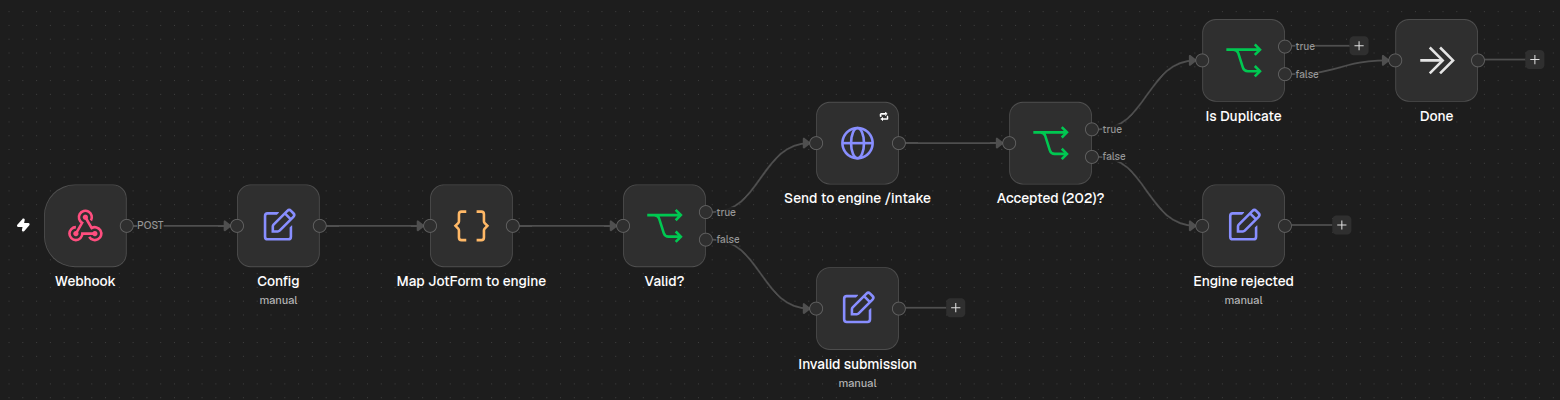
- The form comes in. When a client submits the form, an n8n workflow maps the JotForm fields to the engine’s format, checks it is complete and sends it to the engine. Repeats of the same submission are ignored, and unusable ones (missing answers, no consent) are rejected.
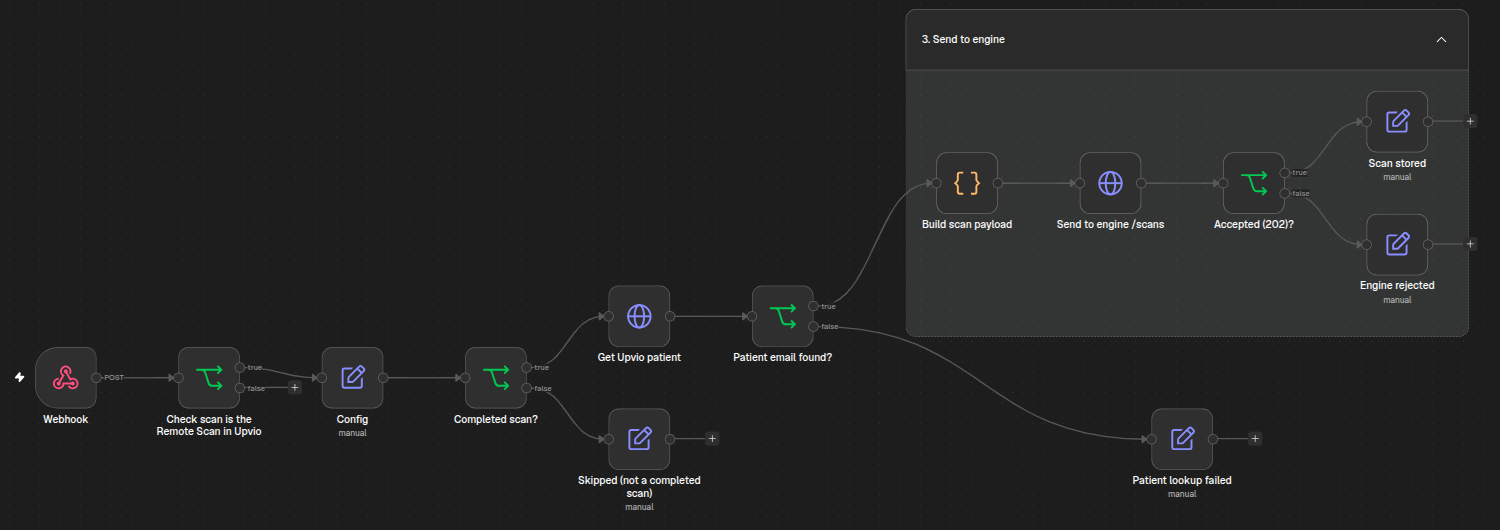
- The scan comes in. A second n8n workflow keeps only completed remote scans, looks up the client’s email through Upvio’s patient API, and sends the scan to the engine.
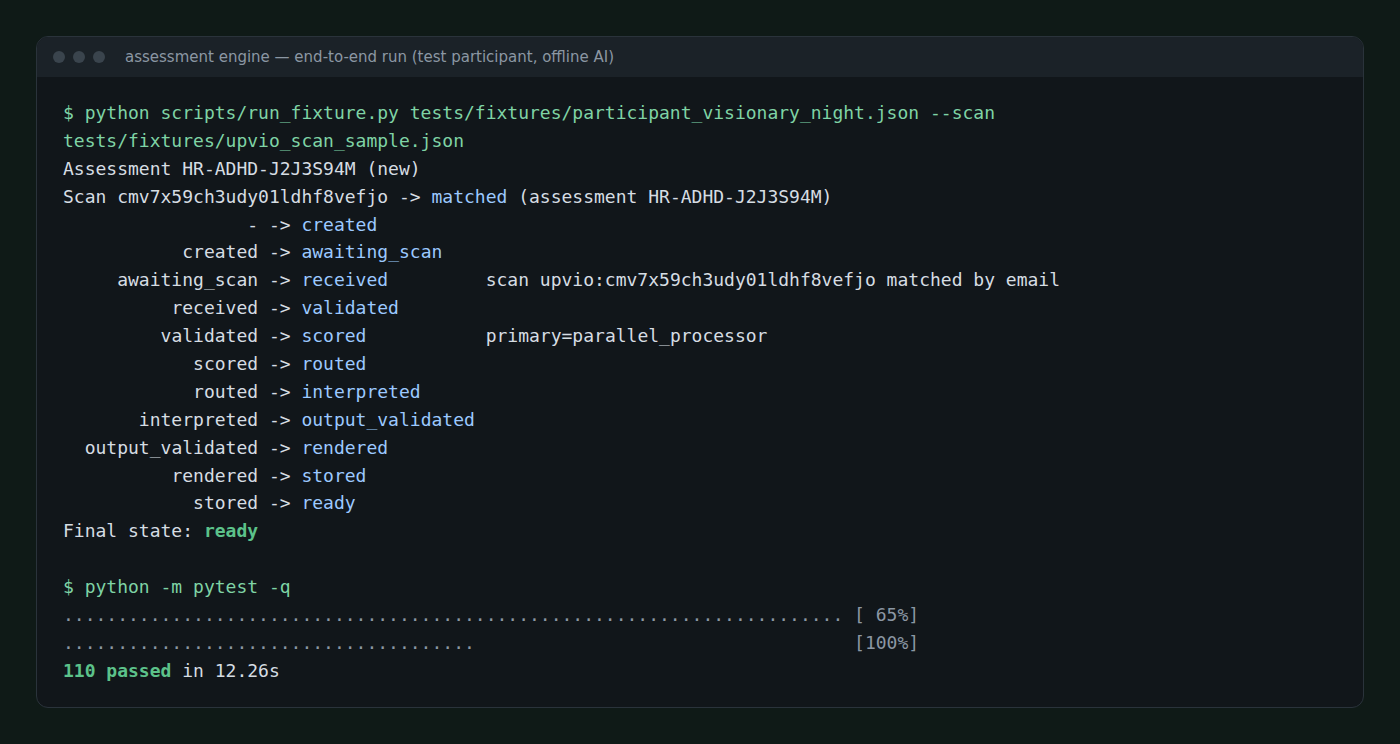
- Form and scan are matched by email. The engine stores whichever arrives first and waits for the other, with no time limit. When both exist, it links them and queues the report. If someone submits twice, the newest wins, and a scan is never reused for a second report.
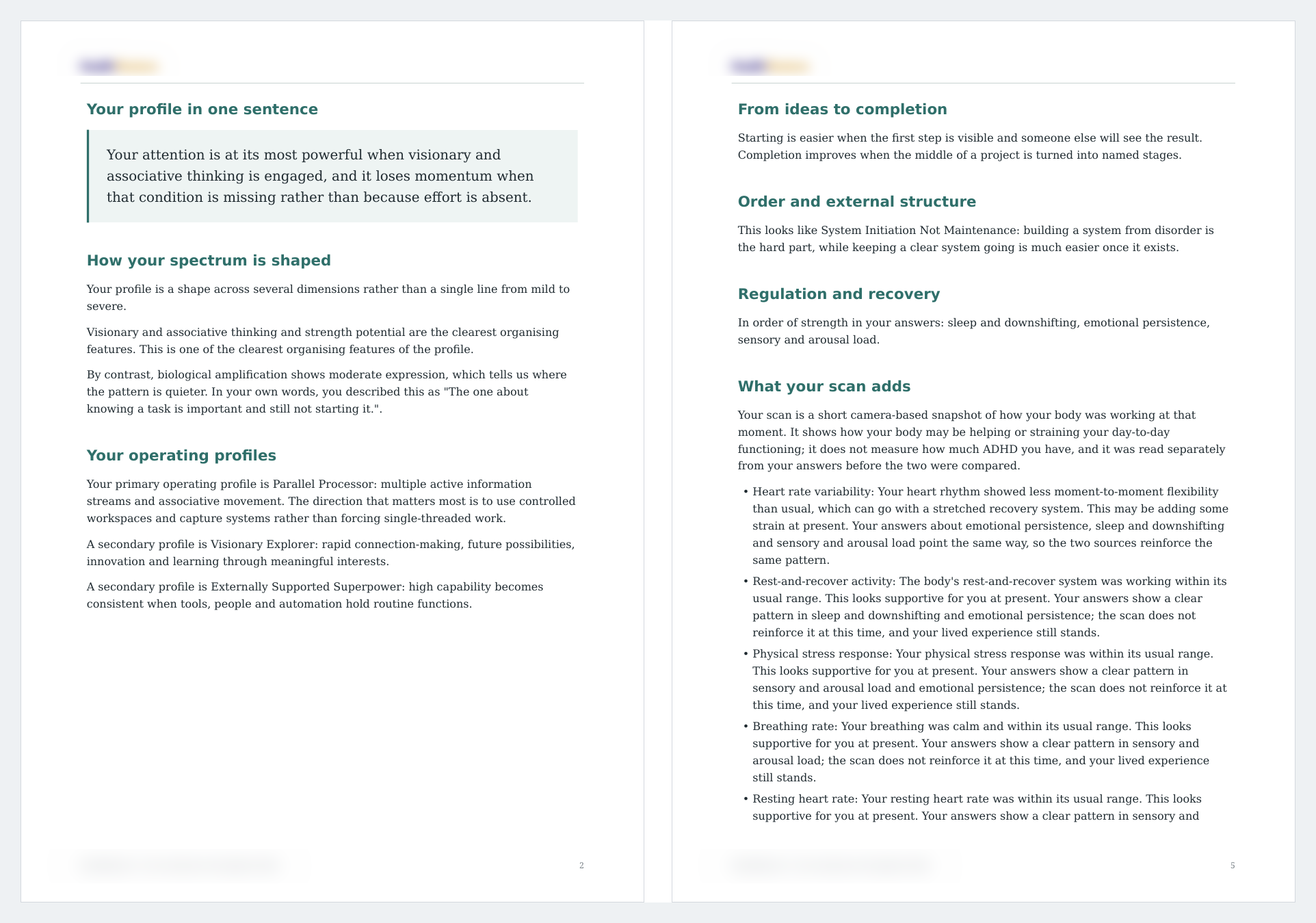
- Code does the scoring. The answers are scored against the company’s rules into dimensions, bands, profiles, an experiment and suitability flags. Each scan reading (heart rate variability, recovery, stress, breathing, heart rate, blood pressure and a wellness score) becomes a plain finding and is compared with the questionnaire.
- AI writes the words. The AI gets a pseudonymised summary, with no name or contact details, and is told exactly which findings and which of the client’s own reflections it may use. It writes the questionnaire sections first and the scan section last.
- Every part is checked. The checks look for correct structure, evidence that points to real findings, use of the client’s words, and anything banned: question numbers, raw values, diagnosis or cause claims, medication advice, hype or US spelling. A failing part gets up to two targeted repairs; if it still fails, safe text built from the scores is used, so every client gets a report.
- The PDF is built. The engine adds the client’s name, builds a branded PDF, stores it and creates a private, unguessable link.
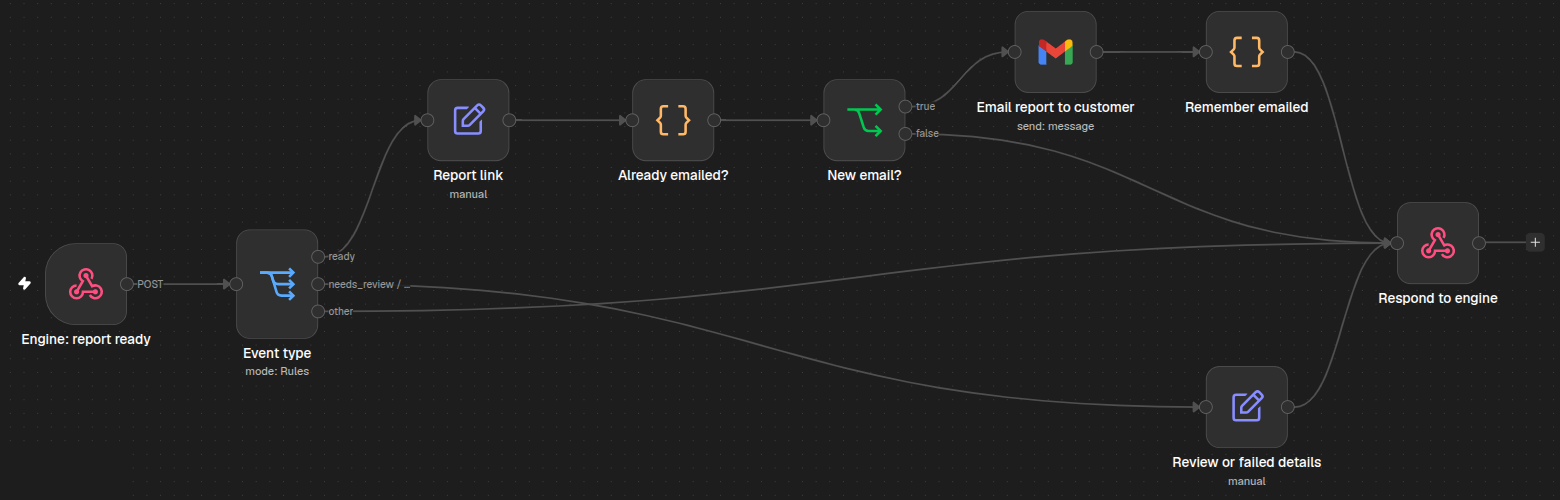
- The client is emailed. The engine tells n8n the report is ready, and a third workflow emails the client their link through Gmail, checking first that they have not already been sent it.
All of this runs in a database-backed job queue with several workers. If the AI service fails, the job is retried, and parts that already passed are kept, not written again. The questions, scoring rules and scan ranges live in one versioned configuration file, so a method change, or a whole new assessment, is a configuration edit rather than new code.
Results & Metrics
The team no longer pairs forms and scans by hand. Each client’s form and scan find each other by email, and a report is scored, written, checked and emailed without anyone stepping in. Nothing reaches a client until it passes the checks, and a temporary AI failure no longer means a missing report.
| Metric | Observed Output |
|---|---|
| Test runs with the live AI model | 14 |
| Typical processing time per report | About 1 minute (median) |
| Processing time range | 39 seconds to just over 2 minutes (13 of 14 runs) |
| AI drafts checked before publishing | 66 |
| Reports sent with banned or unsafe wording | 0 |
| Load test | 1,000 submissions, none lost, duplicated or mixed up |
| Automated tests | 110 passing (100%) |
💡
Metrics come from development and test runs, measured from validated input to stored PDF. The one run outside the range waited on automatic retries. Figures from live client traffic may vary.
Tech Stack
| Technology | Role in the solution |
|---|---|
| JotForm | The 72-question assessment form clients fill in |
| Upvio | The camera-based body scan, and the patient lookup that supplies the email |
| n8n | Three workflows: form intake, scan intake, and the report email |
| Python engine (FastAPI) | Matching, scoring, AI calls, checks, the job queue and the private report links |
| MySQL / MariaDB | Stores assessments, scans, results and the job queue |
| OpenAI | Writes the report narrative from pre-selected findings |
| WeasyPrint | Turns the finished report into a branded PDF |
| Gmail | Sends the client their report link |
The engine runs on the company’s own server next to its database. Clients keep using the same form and scan, and the team keeps working in the tools it already has.
Where This Pattern Applies
This isn’t really about ADHD.
Worked example: a recruitment firm. A candidate fills in a skills questionnaire and records a task on another platform. The two are matched by email, the questionnaire is scored against the firm’s rubric in code, AI writes a candidate summary from the scores only, the summary is checked for banned claims, and a PDF goes to the hiring manager.
- Clinics: intake form plus test results
- Fitness coaching: check-in plus wearable data
- Education: assessment plus coursework
- Insurance: application plus documents
- HR: engagement survey to team report
- Financial advice: fact-find to review pack
The shape: separate inputs are matched to one person, code scores them, AI writes within fixed limits, and checks decide what gets sent. What changes from case to case is the questions, the scoring rules, the second data source and the list of claims that must never appear.