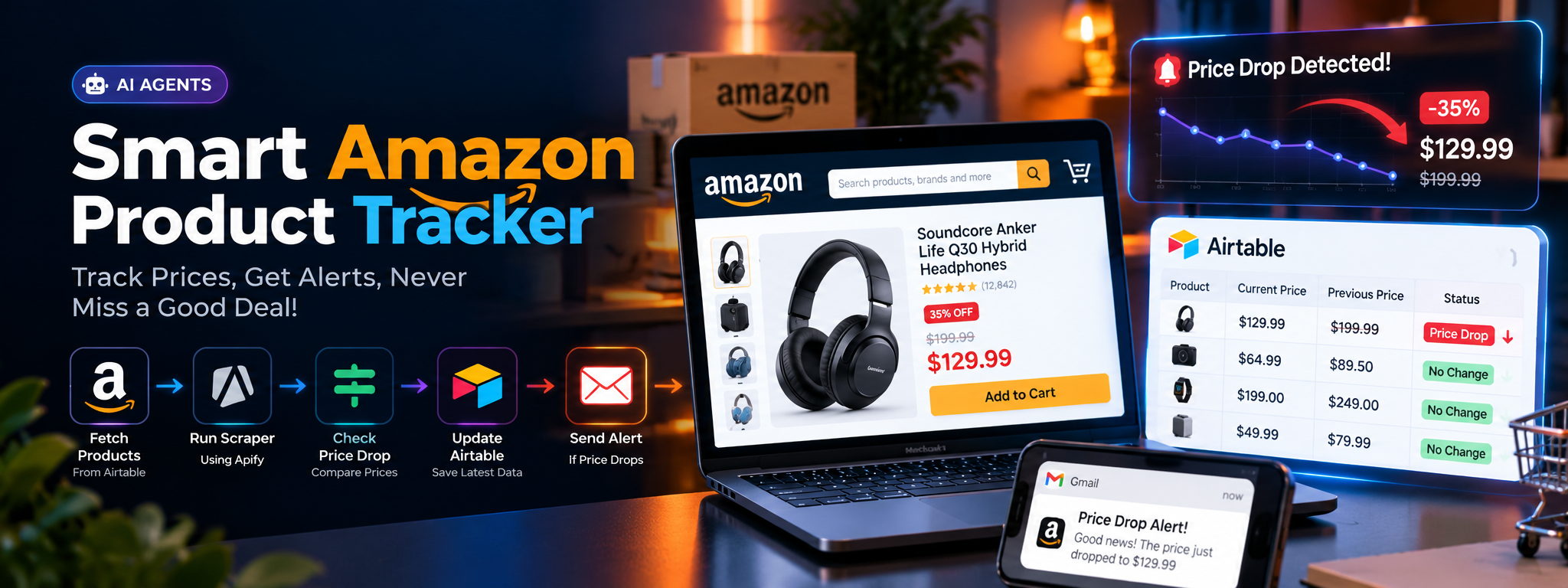
Smart Amazon Product Tracker for Price Drop Alerts
To fetch product details from Amazon and alert you if the price drops, because who doesn’t love a good deal? 💸
- Amazon
- Airtable
- Gmail
- n8n
- Gemini
Project Overview
This project automates the process of monitoring Amazon product prices. Product links are stored in Airtable, where the workflow retrieves the records and sends product URLs to Apify for scraping. Once the scraping process is complete, the workflow retrieves the latest product information, updates the corresponding Airtable records, and checks whether the price has decreased.
When a price drop is detected, an email notification is sent to alert the user. The latest price is saved so it can be used for future comparisons.
01. The Challenge
Monitoring multiple Amazon products manually can be time-consuming and inconsistent. Prices may change between checks, making it difficult to identify savings opportunities quickly.
The main challenges included:
- Manual Price Monitoring: Users must repeatedly visit product pages to check for price changes.
- Scattered Product Information: Tracked products and their previous prices need to be organized in a central location.
- Delayed Price-Drop Detection: Without automated comparisons, a lower price may go unnoticed.
- Repetitive Data Updates: Product details and prices must be refreshed regularly to keep tracking records current.
- Lack of Timely Notifications: Users need a convenient way to learn when a tracked product becomes cheaper.
02. The Solution
An automated workflow connects Airtable, Apify, AI-assisted URL processing, and Gmail to handle product monitoring from beginning to end.
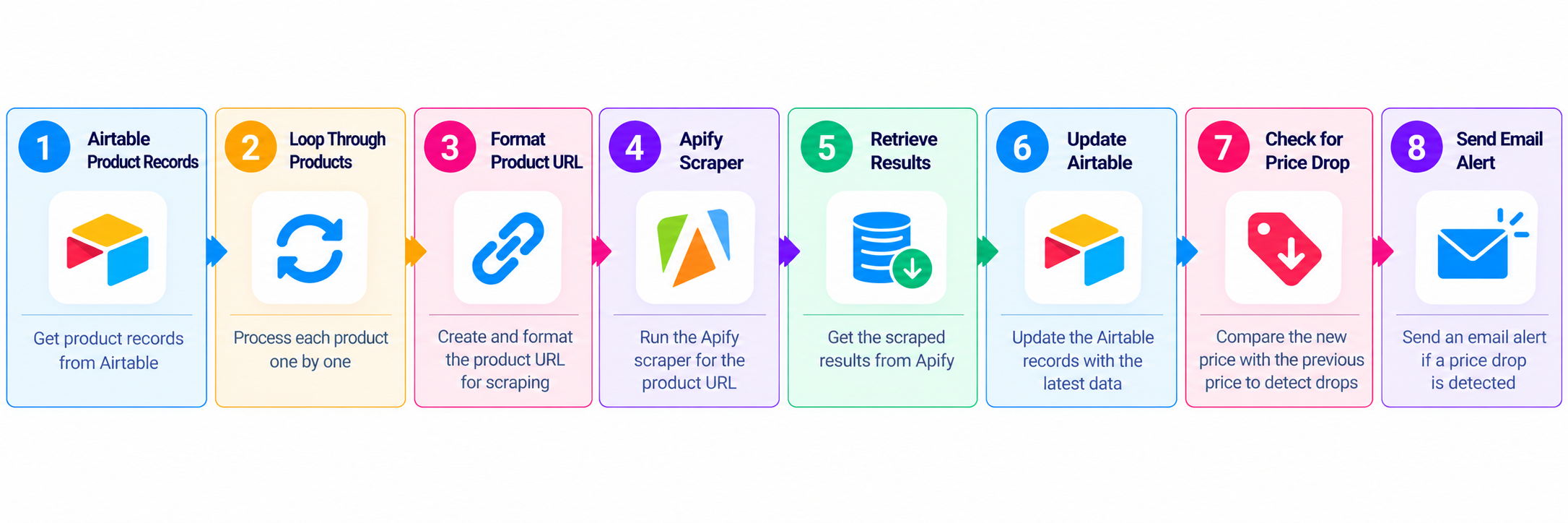
The workflow retrieves tracked products from Airtable, processes each product URL, launches an Apify scraping task, and waits for the results. It then updates the product record with the latest information and compares the new price against the previously stored price.
If the price has decreased, the workflow sends an email notification. If no price drop is detected, it updates the record without sending a price-drop alert.
03. How the Automation Works
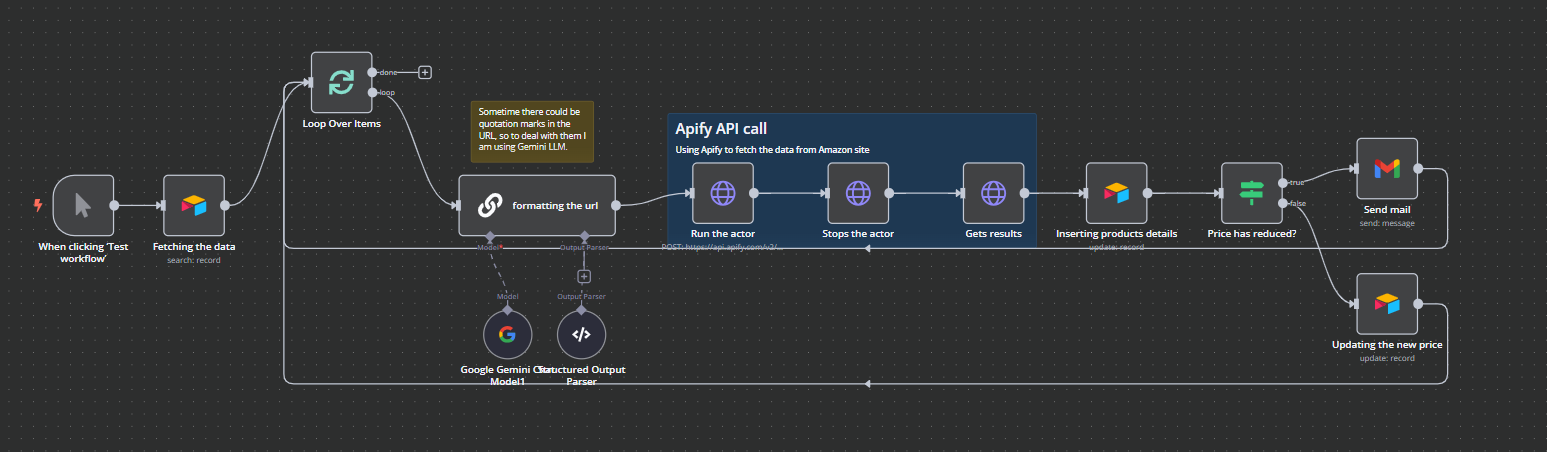
Step 1 — Retrieve Products from Airtable
The workflow begins by retrieving product records from Airtable. These records contain the product information and links needed for price monitoring.
Airtable acts as the central tracking database, allowing the workflow to process multiple products without requiring each product to be entered manually into the scraping process.
Step 2 — Process Product URLs
The workflow loops through the retrieved product records and processes each product URL individually.
A Google Gemini-powered AI component helps format URLs when necessary, including handling quotation marks or other formatting issues that could interfere with the scraping request.
Step 3 — Launch the Apify Scraper
The processed product URL is submitted to Apify through an API request. Apify performs the scraping operation to retrieve available product details from Amazon.
This separates the scraping task from the rest of the workflow and allows the automation to process the results once the scraping operation has finished.
Step 4 — Wait for the Scraping Process
After launching the scraper, the workflow waits for the task to complete. It then requests the results from Apify.
This step ensures that the workflow retrieves the scraping output before attempting to update the product record or compare prices.
Step 5 — Update Product Information
The retrieved product details are written back to the corresponding Airtable record.
Keeping the product data in Airtable provides a centralized view of the tracked products and their latest recorded prices.
Step 6 — Check for a Price Drop
The workflow evaluates whether the latest product price is lower than the previously stored price.
- Price decreased: The workflow follows the notification branch.
- No price decrease: The workflow follows the alternative branch and updates the latest price for future comparisons.
This conditional step ensures that price-drop emails are sent only when the configured comparison identifies a decrease.
Step 7 — Send an Email Alert
When a price drop is detected, the workflow uses Gmail to send an email notification.
The alert informs the user that the tracked product has become cheaper, allowing them to revisit the product and decide whether to purchase it.
Step 8 — Maintain Updated Records
The workflow saves the latest price regardless of whether a price drop is detected. This keeps the stored information current and provides a reference point for subsequent monitoring runs.
04. Workflow
05. Technology Stack
| Technology | Role |
|---|---|
| Airtable | Stores product records and updated price information |
| Apify | Scrapes available Amazon product details |
| Google Gemini | Assists with product URL formatting |
| Gmail | Sends email notifications when a price drop is detected |
| API Requests | Connect the workflow to the scraping service |
06. Key Features
- Automated Product Tracking: Retrieves tracked products from Airtable.
- Batch Processing: Processes product records through a loop.
- AI-Assisted URL Formatting: Helps prepare product URLs for scraping.
- Automated Data Collection: Retrieves available product details through Apify.
- Conditional Price Comparison: Determines whether the latest price is lower than the stored price.
- Email Notifications: Sends alerts when a price decrease is detected.
- Centralized Record Management: Updates product information in Airtable.
- Recurring Monitoring Support: The workflow can be configured to run on a schedule, subject to its scheduling configuration.
07. Business Benefits
Less Manual Work
Automates repetitive product-page checks, data collection, and record updates.
Faster Price-Drop Awareness
Email notifications help users discover price decreases without continually checking Amazon manually.
Better Data Organization
Airtable provides a central place to maintain tracked product records and current prices.
Consistent Monitoring
The workflow follows the same scraping, comparison, and update process for each product it processes.
08. Conclusion
The Smart Amazon Product Tracker demonstrates how API-based scraping, AI-assisted processing, conditional logic, and automated notifications can work together in a single workflow.
By connecting Airtable, Apify, Google Gemini, and Gmail, the solution automates product data collection, maintains updated price records, and notifies users when a tracked product becomes cheaper.